khatab Wedaa ⛩️ (@khatabwedaa) 's Twitter Profile
khatab Wedaa ⛩️

@khatabwedaa

Web designer & developer 🌊. Creator of @meraki_ui, co-founder @TWComponents, Building UI Templates with Tailwind CSS 🍀.

ID: 706092901546237953

linkhttps://merakiui.com calendar_today05-03-2016 12:24:01

3,3K Tweet

701 Followers

238 Following
khatab Wedaa ⛩️ (@khatabwedaa) 's Twitter Profile Photo

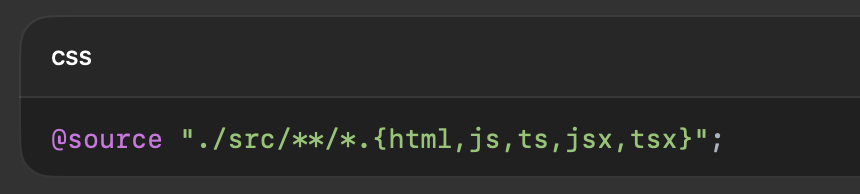
Tailwind CSS v4 Tips - 🔍 Automatic Content Detection Forget manually listing template paths in content: config — v4 does auto content detection. Tailwind will scan your project for class names automatically. For fine-tuning, add: It’s zero-config by default but flexible when

Tailwind CSS v4 Tips - 🔍 Automatic Content Detection

Forget manually listing template paths in content: config — v4 does auto content detection.
Tailwind will scan your project for class names automatically.

For fine-tuning, add:

It’s zero-config by default but flexible when
khatab Wedaa ⛩️ (@khatabwedaa) 's Twitter Profile Photo

Tailwind CSS v4 Tips - ⚡ First-Party Vite Plugin Using Vite? Tailwind v4 ships with an official first-party plugin for blazing builds: Integrates perfectly with Vite’s dev server for instant reloads + CSS updates. #ViteJS #TailwindCSS

Tailwind CSS v4 Tips - ⚡ First-Party Vite Plugin

Using Vite? Tailwind v4 ships with an official first-party plugin for blazing builds:

Integrates perfectly with Vite’s dev server for instant reloads + CSS updates.
#ViteJS #TailwindCSS
khatab Wedaa ⛩️ (@khatabwedaa) 's Twitter Profile Photo

React + Tailwind CSS Pro Tip - ❄️ One Button to Rule Them All Stop making BackButton, IconButton, SubmitButton… You can build ONE <Button /> that does them all: ✅ Normal button ✅ Icon-only button ✅ Loading state ✅ Theming ✅ i18n-ready Here’s how to do it ⬇️ #ReactJS

khatab Wedaa ⛩️ (@khatabwedaa) 's Twitter Profile Photo

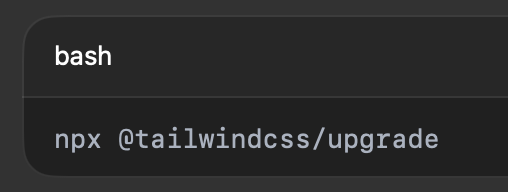
Tailwind CSS v4 Tips - 🛠️ Smooth Upgrade Path Upgrading from v3 → v4 is almost automatic: - Migrates config - Updates imports Preserves your customizations. Requires Node 20+; update your environment first. Run it in a feature branch & review diffs before merging.

Tailwind CSS v4 Tips - 🛠️ Smooth Upgrade Path
Upgrading from v3 → v4 is almost automatic:

- Migrates config
- Updates imports
Preserves your customizations. Requires Node 20+; update your environment first. Run it in a feature branch &amp; review diffs before merging.
khatab Wedaa ⛩️ (@khatabwedaa) 's Twitter Profile Photo

💡 React + Tailwind Pro Tip: Stop fighting long, messy className strings. Use a tiny helper that makes class merging ✨ effortless ✨. Here’s why cn() + clsx (and tailwind-merge) will change your life ⬇️ #ReactJS #TailwindCSS

khatab Wedaa ⛩️ (@khatabwedaa) 's Twitter Profile Photo

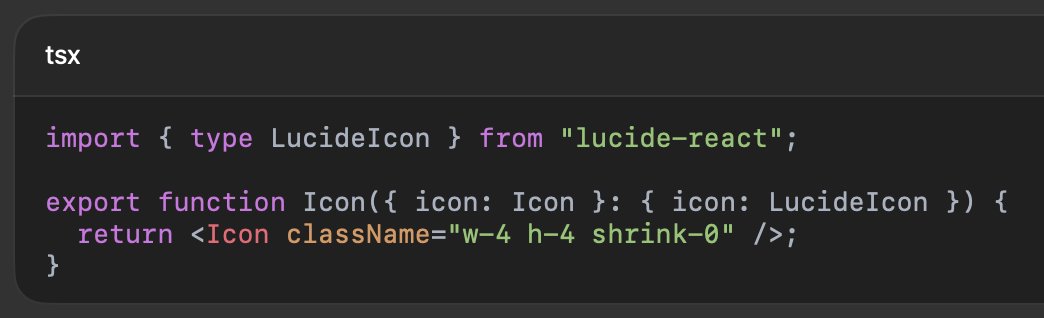
🎯 React + Tailwind CSS Pro Tip: Icons looking misaligned? Fix it once → everywhere. 1️⃣ Pick one icon set (e.g. lucide-react) for consistency. 2️⃣ Create a small wrapper to normalize size & styling: Now every icon: Matches text height Aligns perfectly It's easy to swap ✅

🎯 React + Tailwind CSS Pro Tip:
Icons looking misaligned?
Fix it once → everywhere.

1️⃣ Pick one icon set (e.g. lucide-react) for consistency.
2️⃣ Create a small wrapper to normalize size &amp; styling:

Now every icon:
Matches text height
Aligns perfectly
It's easy to swap

✅
khatab Wedaa ⛩️ (@khatabwedaa) 's Twitter Profile Photo

🎯 React + Tailwind CSS Pro Tip: The Perfect Match React is component-based → UI is built as small, reusable blocks. TailwindCSS is utility-first → styles are written inline as class names. Put them together, and you get: Co-located styles (markup + styling in one place) No

🎯 React + Tailwind CSS Pro Tip: The Perfect Match

React is component-based → UI is built as small, reusable blocks.
TailwindCSS is utility-first → styles are written inline as class names.

Put them together, and you get:
Co-located styles (markup + styling in one place)
No