

UPDF (@updfeditor) 's Twitter Profile
UPDF

@updfeditor

UPDF is an AI-powered PDF Editor.
*Full-featured
*Available on Windows, Mac, Android and iOS
*All-in-one PDF Solution
*One License, All Devices ✨#AIpdfEditor

ID: 1485596520426606594

linkhttps://linktr.ee/UPDF_Editor calendar_today24-01-2022 12:53:27

755 Tweet

558 Followers

6 Following
UPDF (@updfeditor) 's Twitter Profile Photo

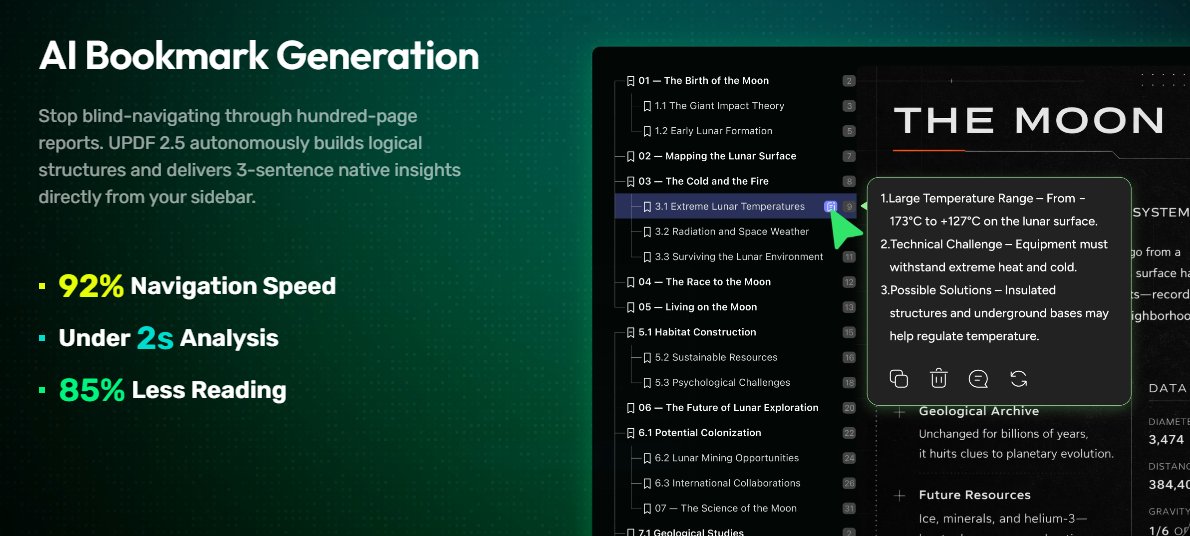
Find what matters instantly. UPDF 2.5’s AI Bookmark Generation builds a logical structure for long PDFs and delivers quick insights—right from the sidebar. ⚡ 92% faster navigation ⚡ Under 2s analysis ⚡ 85% less reading Work through long documents without the overwhelm. #UPDF

Find what matters instantly.
UPDF 2.5’s AI Bookmark Generation builds a logical structure for long PDFs and delivers quick insights—right from the sidebar.

⚡ 92% faster navigation
⚡ Under 2s analysis
⚡ 85% less reading

Work through long documents without the overwhelm.
#UPDF
UPDF (@updfeditor) 's Twitter Profile Photo

Teacher sends a PPT. You need a PDF to take notes. Instead of switching between tools, just open UPDF. Convert the PPT to PDF, highlight, and add notes — all in one place. Simple. Smooth. Done. #UPDF #UPDFEditor #PDFEditor #Productivity

UPDF (@updfeditor) 's Twitter Profile Photo

Creating video scripts just got easier. With UPDF AI’s agent-based tools, you can research, organize, and generate content without switching between multiple apps. Less friction, more creation. #UPDF #UPDFAI #AIWorkflow youtu.be/GHspzLBOMXk?si… via YouTube

UPDF (@updfeditor) 's Twitter Profile Photo

Too many PDF pages to number manually? Add page numbers to all pages in seconds with UPDF. #UPDF #PDFtips #AddPageNumbers #Productivity #TechTips

UPDF (@updfeditor) 's Twitter Profile Photo

Long study PDF? Split it into equal parts and study one section each day. #UPDF #SplitPDF #StudyTips #Productivity #StudentTools

UPDF (@updfeditor) 's Twitter Profile Photo

Why UPDF Is One of the Most Practical Adobe Alternatives Right Now techpowerup.com/348420/why-upd… via TechPowerUp #updf #adobealternative #techpowerup #PDFTools

UPDF (@updfeditor) 's Twitter Profile Photo

Used to convert PDFs to Word every time I needed to edit something… and the formatting always broke. This time I just opened the PDF in UPDF and edited the text directly. No converting, no fixing layouts — just quick edits and save. #UPDF #PDFEditor

UPDF (@updfeditor) 's Twitter Profile Photo

Tired of plain white PDFs? Generate stunning visual backgrounds instantly with UPDF AI Agent. #UPDF #UPDFAI #AIAgent #PDFdesign #AIDesign

Tired of plain white PDFs?
Generate stunning visual backgrounds instantly with UPDF AI Agent.
#UPDF #UPDFAI #AIAgent #PDFdesign #AIDesign
UPDF (@updfeditor) 's Twitter Profile Photo

UPDF 2.5 finally fixes search: type “responsibility” — it finds “liability.” 🤯 Plus AI bookmarks, summaries, and one‑click page cleanup. Full review from: igeeksblog.com/updf-better-wa… #UPDF #PDFEditor #AIProductivity #Technik

UPDF (@updfeditor) 's Twitter Profile Photo

UPDF 2.5 finally fixes search: type “responsibility” — it finds “liability.” 🤯 Plus AI bookmarks, summaries, and one‑click page cleanup. Full review from iGeeksBlog igeeksblog.com/updf-better-wa… #UPDF #PDFEditor #AIProductivity #Tech #Productivity

UPDF (@updfeditor) 's Twitter Profile Photo

A way to make your study easier - No need to read and understand the document page by page anymore! UPDF quickly summarizes and distills document content to facilitate rapid comprehension, and even allows you to engage in a dialogue with the document📷 #UPDF #StudySmarter

UPDF (@updfeditor) 's Twitter Profile Photo

🚨 4.0 on Trustpilot. 1,106 real user reviews. Not bots. Not fluff. People are calling UPDF a "lightweight yet capable alternative" to the heavyweight PDF tools. We're building something people actually love using — one update, one review at a time. #UPDF #Trustpilot #PDFeditor

🚨 4.0 on Trustpilot.
1,106 real user reviews. Not bots. Not fluff.
People are calling UPDF a "lightweight yet capable alternative" to the heavyweight PDF tools.
We're building something people actually love using — one update, one review at a time.
#UPDF #Trustpilot #PDFeditor
UPDF (@updfeditor) 's Twitter Profile Photo

No more flipping through endless pages. Just upload, ask, and ace your interview prep. 📷 Turn hours into minutes. Turn stress into confidence. 📷 Try UPDF AI now #UPDF #AIforWork #PDFProductivity #InterviewTips #DocumentAI #ChatWithPDF

UPDF (@updfeditor) 's Twitter Profile Photo

🧵 Why do people choose UPDF? ✅ "Clean & fast" ✅ "AI chat changed how I work with PDFs" ✅ "No more Adobe bloat" ✅ "Works on all my devices" #UPDF #PDFEditor #WhyChooseUPDF #BuildInPublic #UserLove

🧵 Why do people choose UPDF?
✅ "Clean & fast"
✅ "AI chat changed how I work with PDFs"
✅ "No more Adobe bloat"
✅ "Works on all my devices"
#UPDF #PDFEditor #WhyChooseUPDF #BuildInPublic #UserLove
UPDF (@updfeditor) 's Twitter Profile Photo

📷 Got a 50‑page PDF handed to you right before a big speech? Open UPDF and let AI do the heavy lifting. UPDF AI helps you: Summarize the entire document in seconds Extract core messages & key arguments Answer specific questions instantly #PublicSpeaking #AIProductivity #UPDF

UPDF (@updfeditor) 's Twitter Profile Photo

⚡️ Type. Generate. Stamp. UPDF 2.5 introduces the AI Stamp Agent – turns your text prompt into a custom PDF stamp in one click. No manual design. No template hunting. 🔹 "PAID in red" 🔹 "Confidential – bottom corner" 🔹 "Approved with border" #UPDF #AIStamp #PDFEditor

⚡️ Type. Generate. Stamp.
UPDF 2.5 introduces the AI Stamp Agent – turns your text prompt into a custom PDF stamp in one click.

No manual design. No template hunting.
🔹 "PAID in red"
🔹 "Confidential – bottom corner"
🔹 "Approved with border"
#UPDF #AIStamp #PDFEditor
UPDF (@updfeditor) 's Twitter Profile Photo

"I was so tired of wasting time on PDFs." – real UPDF user. Then he found UPDF. ✅ Edit like a pro ✅ Chat with any PDF – ask questions, get answers ✅ Get back hours of her life 🎥 See his story 👇 #UPDF #PDFProductivity #ChatWithPDF

UPDF (@updfeditor) 's Twitter Profile Photo

✨ PDF stickers, AI‑generated. UPDF 2.5's new AI Sticker Agent: Type a description → get a custom sticker → place it on your PDF. Yes, really. #UPDF #AISticker #PDFfun

✨ PDF stickers, AI‑generated.

UPDF 2.5's new AI Sticker Agent:
Type a description → get a custom sticker → place it on your PDF.
Yes, really.

#UPDF #AISticker #PDFfun
UPDF (@updfeditor) 's Twitter Profile Photo

Screenshot → Extract image → Insert into PDF. That's it. UPDF makes it happen in seconds. No more messy copy-paste. Just clean, professional documents. Try it 👉 bit.ly/4f6vBx5 #UPDF #PDF #productivity #screenshot