🐪Karlo Pavičić-Ravlić 🐘 (@classickarlo) 's Twitter Profile
🐪Karlo Pavičić-Ravlić 🐘

@classickarlo

2D/3D Animator / Visual Development | Available for work
BA at Academy of Arts, Zagreb. MA at Gobelins, Paris.

ID: 867657943

linkhttps://kpavicic.com/ calendar_today08-10-2012 08:45:15

255 Tweet

288 Followers

155 Following
Kevin Molina-Ortiz (@toonstep) 's Twitter Profile Photo

Woke up with a looming deadline, but no desire to draw so I decided to do the majority of my #TransformersEarthspark assignment in 3D instead. It may not look it, but this was all put together in Toon Boom Animation Storyboard Pro - I don't think people realize how powerful that app is

🐪Karlo Pavičić-Ravlić 🐘 (@classickarlo) 's Twitter Profile Photo

Today at work we ran into a bit of a UI challenge regarding #b3d and keyframes which couldn't be moved or deleted. If you've had trouble with "Only Show Selected" or "Show Hidden" buttons in the past, please check it out and contribute to the discussion. blender.community/c/rightclickse…
🐪Karlo Pavičić-Ravlić 🐘 (@classickarlo) 's Twitter Profile Photo

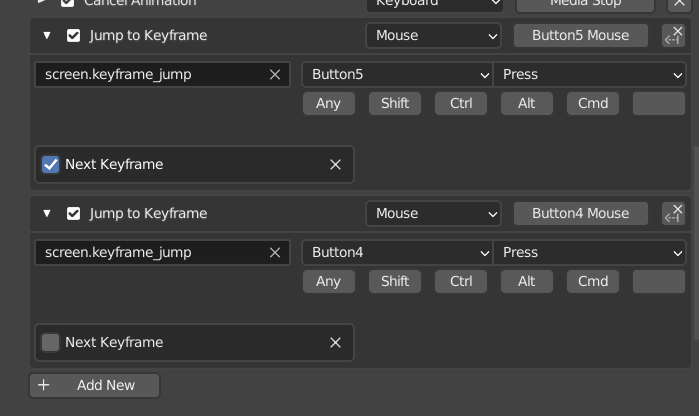
🔨#Blender #animation tip 🔨 If your mouse has side buttons you can bind them to jump from keyframe to keyframe instead of having to press up/down arrows (up/down bind will still work though). Keymap>Frames>Add New and "screen.keyframe_jump" #b3d

🔨#Blender #animation tip 🔨
If your mouse has side buttons you can bind them to jump from keyframe to keyframe instead of having to press up/down arrows (up/down bind will still work though). 
Keymap>Frames>Add New and "screen.keyframe_jump"

#b3d
🐪Karlo Pavičić-Ravlić 🐘 (@classickarlo) 's Twitter Profile Photo

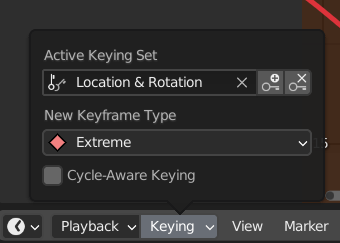
🔨#Blender #animation tip 🔨 You can set the Keying set under the Keying menu in the Timeline, so you don't need to press "I" and select from the dropdown menu every time you want to set a key. You can also set keyframe type here.

🔨#Blender #animation tip 🔨

You can set the Keying set under the Keying menu in the Timeline, so you don't need to press "I" and select from the dropdown menu every time you want to set a key. You can also set keyframe type here.
🐪Karlo Pavičić-Ravlić 🐘 (@classickarlo) 's Twitter Profile Photo

🔨Blender Animation tip 🔨 Ctrl+spacebar will maximize the active area, but ctrl+alt+spacebar will full screen the area without any UI or Tool windows. I prefer no UI when reviewing my work so I switch these shortcuts around :) #b3d #animation #ui #tip

🔨Blender Animation tip 🔨
Ctrl+spacebar will maximize the active area, but ctrl+alt+spacebar will full screen the area without any UI or Tool windows. I prefer no UI when reviewing my work so I switch these shortcuts around :)

#b3d #animation #ui #tip
🐪Karlo Pavičić-Ravlić 🐘 (@classickarlo) 's Twitter Profile Photo

I’ve been learning Unreal for the past half year. My journey has been accompanied by taking notes on how to do specific things and useful shortcuts I often forget. I’m considering releasing them online somewhere if they get large enough 🤔