SSHS Tech Team (@sshs_techteam) 's Twitter Profile
SSHS Tech Team

@sshs_techteam

Official SSHS_TechTeam. Daily Tech tips. Need assistance or help with a problem tweet, call, email or come to our office in the tech center

ID: 771159928597680128

calendar_today01-09-2016 01:37:09

83 Tweet

168 Followers

134 Following

SSHS Tech Team (@sshs_techteam) 's Twitter Profile Photo

#TechTip -4 OneNote like anything needs to sync from time to time. Try right clicking on your notebook title and clicking sync notebook.

#TechTip -4
OneNote like anything needs to sync from time to time. Try right clicking on your notebook title and clicking sync notebook.
SSHS Tech Team (@sshs_techteam) 's Twitter Profile Photo

Need 2 study but find carrying flashcards cumbersome! Try Cram flash 🃏s the mobile version on the appstore or go to Cram.com

Need 2 study but find carrying flashcards cumbersome! Try Cram flash 🃏s the mobile version on the appstore or go to Cram.com
SSHS Tech Team (@sshs_techteam) 's Twitter Profile Photo

#TechTip-19 la dee da dee da...Oops you just accidentally closed your browser tabs no worry press "Control + Shift + T" #best #tip #ever

SSHS Tech Team (@sshs_techteam) 's Twitter Profile Photo

#TechTip -21 What's 9+10...21? Terrible at math? Just 🔍 "Calculator" in the search bar in the bottom left hand corner of your laptop!

SSHS Tech Team (@sshs_techteam) 's Twitter Profile Photo

#TechTip -22 Theres always a faster way to do a task in Windows 10. One tool is open Quick settings by pressing the Windows key + I

SSHS Tech Team (@sshs_techteam) 's Twitter Profile Photo

#TechTip -23 It can be a jungle in Onenote when trying to & find your work an easy way to find ur stuff is using the built in search bar!

#TechTip -23
It can be a jungle in Onenote when trying to & find your work an easy way to find ur stuff is using the built in search bar!
SSHS Tech Team (@sshs_techteam) 's Twitter Profile Photo

#sulsprhs don't forget to check out our blog sshshotspot.weebly.com! You can find helpful how-to blogs like sshshotspot.weebly.com/student-how-to….

SSHS Tech Team (@sshs_techteam) 's Twitter Profile Photo

#TechTip 24 Plug your Android/iOS phone to your Windows 10 computer this will launch Phone app scroll & select the Import photos and videos

SSHS Tech Team (@sshs_techteam) 's Twitter Profile Photo

#TechTip -25 Using 1Note but hate having to click back & forth between folders/notebooks Click Ctrl+M to open a new 1Note tab #TheOffice

SSHS Tech Team (@sshs_techteam) 's Twitter Profile Photo

#TechTip -26 On the go or just dont feel like using your laptop 4 your PowerPoint Microsoft has a slew of productivity Apps on iOS & Android

SSHS Tech Team (@sshs_techteam) 's Twitter Profile Photo

#TechTip -27 Access and share your photos, docs, and more from anywhere using the #Microsoft #OneDrive app on your mobile device!

SSHS Tech Team (@sshs_techteam) 's Twitter Profile Photo

Need help with your laptop? Ask a friend they may have encountered the same problem you have. If your still having problems come visit us.

SSHS Tech Team (@sshs_techteam) 's Twitter Profile Photo

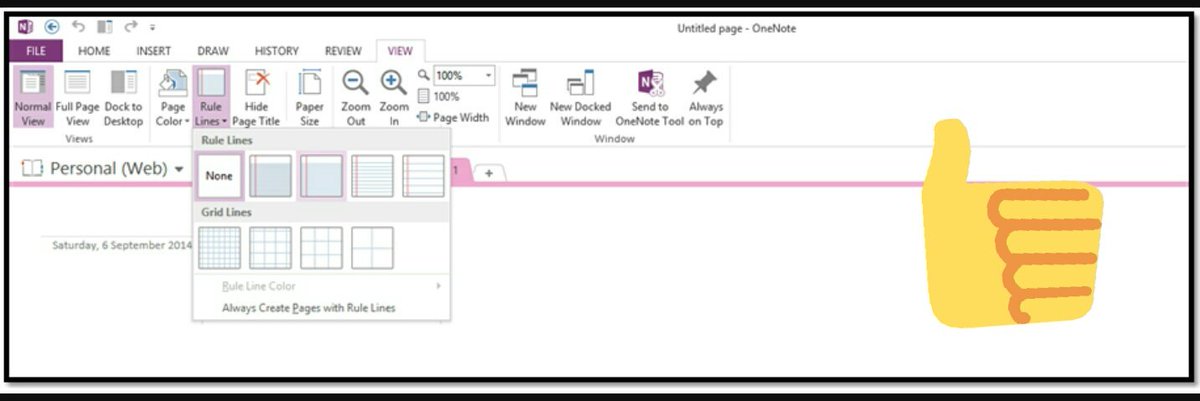
TechTip -28 For all you paper lovers who miss writing on physical paper. Try 1Note's paper template for typing notes on 1Note.

TechTip -28
For all you paper lovers who miss writing on physical paper. Try 1Note's paper template for typing notes on 1Note.
SSHS Tech Team (@sshs_techteam) 's Twitter Profile Photo

#EarthDay Its Earth day🌎 do the Earth a favor and empty your computers recycling bin♻🗑 that hasn't been touched in 6 months🌳