GenerateBanners (@generatebanners) 's Twitter Profile
GenerateBanners

@generatebanners

GenerateBanners helps you auto-generate images for social media, e-commerce, advertising, personalized email...

ID: 1399278910597181448

linkhttps://generatebanners.com calendar_today31-05-2021 08:18:34

152 Tweet

82 Takipçi

36 Takip Edilen

Thibaut Patel ☀️ (@thibpat) 's Twitter Profile Photo

Oh, is that a QR code on a GenerateBanners image?? Yep yep it is, it's live to support all your crazy use cases. Document verification, conference badge...

Oh, is that a QR code on a GenerateBanners image??

Yep yep it is, it's live to support all your crazy use cases.

Document verification, conference badge...
Thibaut Patel ☀️ (@thibpat) 's Twitter Profile Photo

I've taken the decision to remove the video feature from GenerateBanners for several reasons: 1. This feature has not been used by any users 2. It was far from being useful 3. Removing it enables a better focus on generating images easily
GenerateBanners (@generatebanners) 's Twitter Profile Photo

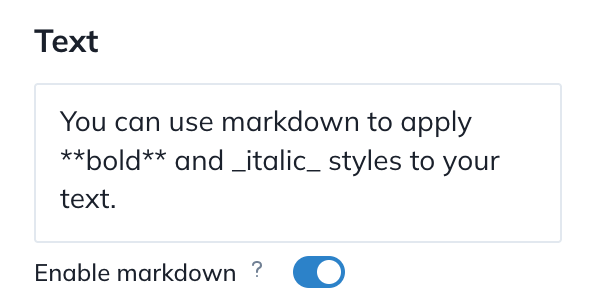
New feature ✨ You can now apply bold and italic styles to your text! 1. Toggle "Enable markdown" 2. To use bold, surround your text with double stars: this **word** is bold 3. To use italic, surround your text with a single underscore: this _word_ is italic

New feature ✨

You can now apply bold and italic styles to your text!

1. Toggle "Enable markdown"
2. To use bold, surround your text with double stars: this **word** is bold
3. To use italic, surround your text with a single underscore: this _word_ is italic
GenerateBanners (@generatebanners) 's Twitter Profile Photo

We're fixing some bugs on the Canva design import feature. It's still a work in progress, so we're listening closely to your feedback!

We're fixing some bugs on the Canva design import feature.

It's still a work in progress, so we're listening closely to your feedback!
GenerateBanners (@generatebanners) 's Twitter Profile Photo

🆕 You can generate images from a CSV file easily! Go to your template, choose the "Grid view". Import your CSV file, match the columns with your template variables. You can now preview and download all your images ✅