ExcelNinjas 💻 (@excelninjashq) 's Twitter Profile
ExcelNinjas 💻

@excelninjashq

Unlock Excel's power with expert tips. 📊 Become an Excel ninja and master spreadsheets with our advice. 💪 Follow us for actionable insights and insider hacks.

ID: 1636553544139526145

calendar_today17-03-2023 02:22:33

104 Tweet

77 Takipçi

177 Takip Edilen

ExcelNinjas 💻 (@excelninjashq) 's Twitter Profile Photo

🧵Excel is a powerful tool for analyzing, organizing, and presenting data. 💻📊 Whether you're a - business professional - student - or just looking to improve your Excel skills, there are many useful tools available to help you work more efficiently and effectively. 📈📊

ExcelNinjas 💻 (@excelninjashq) 's Twitter Profile Photo

📈 Want to become an Excel superstar?🌟 👩🏽‍💼👨🏻‍💼Grow your audience and become the go-to expert!💻 💡Check out these top-notch tips to skyrocket your Excel skills and attract new users to your page!🚀 #Excel #GrowthHacking #AudienceBuilding

ExcelNinjas 💻 (@excelninjashq) 's Twitter Profile Photo

Stop trying to convince people that you're an expert. Start creating valuable content that will make people want to follow you and learn from you.

ExcelNinjas 💻 (@excelninjashq) 's Twitter Profile Photo

Tired of sifting through duplicate data in Excel? 😩 💡Save time with this simple hack: Select the column(s) you want to remove duplicates from, go to "Data" > "Remove Duplicates" and voila! #ExcelHack #ProductivityTip

ExcelNinjas 💻 (@excelninjashq) 's Twitter Profile Photo

Great tip CrispEXCEL Training & Consulting! FILTER is definitely a powerful function in Excel for looking up common items between lists. It can save a lot of time and effort compared to other methods. #ExcelHack #ProductivityTip

ExcelNinjas 💻 (@excelninjashq) 's Twitter Profile Photo

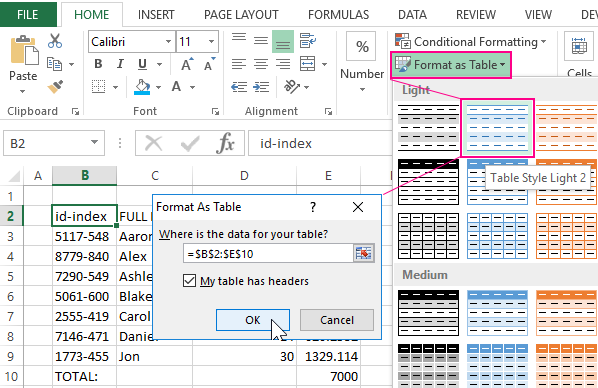
🚀Excel tip time! 📈 Do you use Excel? Check out this awesome hack: ⚡️ Quickly format your data as a table for easier sorting, filtering, and analyzing 🤓 No more tedious manual formatting 🙌

🚀Excel tip time! 📈

Do you use Excel? Check out this awesome hack: 

⚡️ Quickly format your data as a table for easier sorting, filtering, and analyzing 🤓

No more tedious manual formatting 🙌
ExcelNinjas 💻 (@excelninjashq) 's Twitter Profile Photo

🚀 Excel Tip 🚀 Quickly format your data as a table by selecting your data and pressing Ctrl + T. This will give you built-in filters and formatting options, making your data easy to read and manipulate 📈💻

CheatSheets (@the_cheatsheets) 's Twitter Profile Photo

How to remove empty rows in Excel! 🗂️ Don’t forget to save this post! #excel #exceltips #exceltricks #spreadsheets #corporate #accounting #finance #workhacks #tutorials

CrispEXCEL Training & Consulting (@crisp_excel) 's Twitter Profile Photo

4-Ways Match XLOOKUP If you have not started using the new dynamic array functions...Start Now! Makes everything easier to solve. Especially when combined with named ranges. =XLOOKUP(1, (Dates=I26)*(Sales_Rep=I28)*(Product=I30), Mar) #EXCEL #programming #accounting

ExcelNinjas 💻 (@excelninjashq) 's Twitter Profile Photo

💡VStack function in Excel is a game-changer! It allows you to stack multiple ranges vertically, simplifying data consolidation and analysis. Say goodbye to tedious manual adjustments. 📊💪 #Excel