Stephanie Shackelford (@steph_shack) 's Twitter Profile
Stephanie Shackelford

@steph_shack

Wife, mom, teacher, pure awesomeness

ID: 440374891

calendar_today18-12-2011 22:37:48

189 Tweet

122 Followers

166 Following

Albert (@learnwithalbert) 's Twitter Profile Photo

We love seeing how Lindsey Tashman is using Albert for #APES prep 💪 #Teachers, your time is valuable — especially during testing season! Let us take care of grading and creating high-quality practice questions and explanations 😎 @techstephshack #edchat


TCEA (@tcea) 's Twitter Profile Photo

Preparing students to take tests can be daunting enough but what if that test has to be taken online? Use these practical strategies to take out the difficulty and frustration of online testing. ow.ly/gJWy50nybGT ⚡️💻#k12 #testing #teachertips #edtechchat #edchat #txedu

Preparing students to take tests can be daunting enough but what if that test has to be taken online? Use these practical strategies to take out the difficulty and frustration of online testing. ow.ly/gJWy50nybGT ⚡️💻#k12 #testing #teachertips #edtechchat #edchat #txedu
TCEA (@tcea) 's Twitter Profile Photo

Been on a #FlipHunt? Fliphunts is an engaging way to get Ss moving and having fun while exploring your curriculum. @Flipgrid + Kathi Kersznowski ⛵️ shares everything you need to know to create and use a #Fliphunt💚 ow.ly/7elM50nyGJ5 #flipgrid #flipgridfever #k12 #edtech
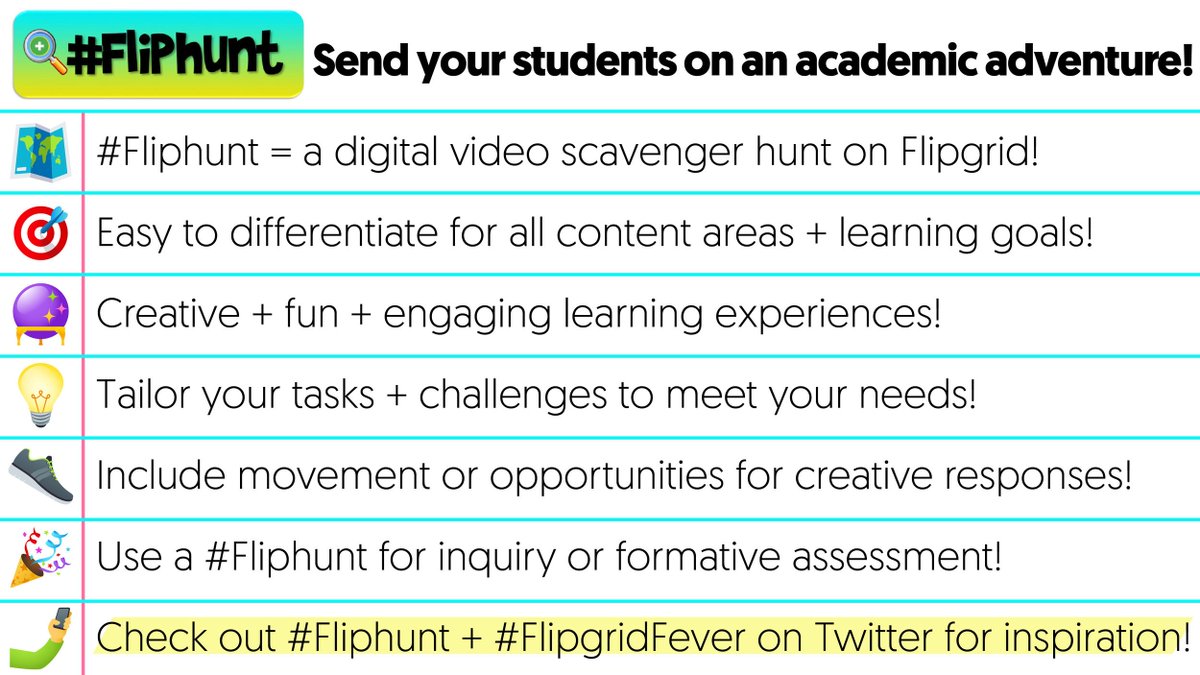

Been on a #FlipHunt? Fliphunts is an engaging way to get Ss moving and having fun while exploring your curriculum. @Flipgrid + <a href="/kerszi/">Kathi Kersznowski ⛵️</a> shares everything you need to know to create and use a #Fliphunt💚
ow.ly/7elM50nyGJ5 #flipgrid #flipgridfever #k12 #edtech
Flip Events (@flipgridevents) 's Twitter Profile Photo

The #SkypeClassroom broadcast with Dr. Jane Goodall is only 1️⃣ week away! It's not too late to register and be sure to download the FREE activity plan to help prepare for the broadcast. #Skype2Learn Roots & Shoots USA Dr. Jane Goodall & the Jane Goodall Institute ➡ msft.social/eVZdND


MISD Digital Learning Team (@misddlteam) 's Twitter Profile Photo

DFW Educators - you're invited to our 3rd annual techKNOWvation Conference on Saturday, May 4️⃣! Come explore innovative ideas + strategies for technology integration to enhance both teaching + learning! $10 MISD; $15 non-MISD Register today ➡ bit.ly/techKNOWvation…

DFW Educators - you're invited to our 3rd annual techKNOWvation Conference on Saturday, May 4️⃣!

Come explore innovative ideas + strategies for technology integration to enhance both teaching + learning!

$10 MISD; $15 non-MISD

Register today ➡ bit.ly/techKNOWvation…
Kim Murphree (@murphree_kim) 's Twitter Profile Photo

Wanna get a jump start on next year’s PD- AND learn a lot of new technology strategies for your classroom? Plus prizes!!!! #TechKNOW19 Register here 👉 bit.ly/techknowregist… Would love to see you there :)

Wanna get a jump start on next year’s PD- AND learn a lot of new technology strategies for your classroom?  Plus prizes!!!!  #TechKNOW19 Register here 👉 bit.ly/techknowregist… Would love to see you there :)
Brian Brown, Ph.D. (@bbrownphd) 's Twitter Profile Photo

Tomorrow is the big day! Join TCEA for zip, zero, nada, absolutely nothing and immediately start taking advantage of the membership benefits! Credit for the pic goes to Mindi Vandagriff #TCEA #TeacherAppreciation

Tomorrow is the big day! Join <a href="/TCEA/">TCEA</a> for zip, zero, nada, absolutely nothing and immediately start taking advantage of the membership benefits! Credit for the pic goes to <a href="/MindiVandagriff/">Mindi Vandagriff</a> #TCEA #TeacherAppreciation
TCEA (@tcea) 's Twitter Profile Photo

You get a membership! You get a membership! You get a membership! #TCEA is offering FREE 1 year memberships to every educator everywhere. #HappyTeacherAppreciation Week from TCEA! ow.ly/3DgX50tZg6M #edchat #edtechchat #elemchat #k12 #edu

Estee Williams (@esteeeducates) 's Twitter Profile Photo

💡 I recently learned if you right click on a slide in Google Slides, you can copy it then go into a Google Doc and paste the slide as an image. This is quite handy when trying to create visuals inside of a Google Doc. Before, I did Insert > Drawing to make visuals within Docs.

💡 I recently learned if you right click on a slide in Google Slides, you can copy it then go into a Google Doc and paste the slide as an image. This is quite handy when trying to create visuals inside of a Google Doc. Before, I did Insert &gt; Drawing to make visuals within Docs.
Wakelet 💙 (@wakelet) 's Twitter Profile Photo

🌊 Have you tried Read Mode on Wakelet? 🌊 Now your students can read entire articles without having to leave Wakelet! Fully compatible with Immersive Reader - you can share accessible, secure content with your class 💙 Give it a go here 👉 wakelet.com

🌊 Have you tried Read Mode on Wakelet? 🌊

Now your students can read entire articles without having to leave Wakelet! 
Fully compatible with Immersive Reader - you can share accessible, secure content with your class 💙

Give it a go here 👉 wakelet.com