Abbott Katz (@abbottkatz) 's Twitter Profile
Abbott Katz

@abbottkatz

Likes: Excel, Jazz
Instructor/Author, "Up Up and Array! Dynamic Array Formulas for Excel 365 and Beyond" (Apress)

ID: 158317872

calendar_today22-06-2010 10:35:49

8,8K Tweet

465 Takipçi

1,1K Takip Edilen

Abbott Katz (@abbottkatz) 's Twitter Profile Photo

An Excel 365 formula to EXCLUDE columns from a large multi-field dataset (named all): 1. enter numbers of the columns to be excluded, say in A1:A10 (e.g. you want to omit 10 columns). 2. Write: =LET(x,SEQUENCE(COLUMNS(all)),CHOOSECOLS(all,FILTER(x,ISNA(MATCH(x,A1:A10,0)))))

Abbott Katz (@abbottkatz) 's Twitter Profile Photo

A supermarket awards 1 point for each dollar spent but rounds down, ignoring cents. Of these expenditures in A1:A3: $34.79 $41.91 $16.51 Which correctly calculates the point total? A)=ROUNDDOWN(SUM(A1:A3),0) B)=SUM(ROUNDDOWN(A1:A3,0)) Answer: B)-yields 91 points. A) nets 93.

Abbott Katz (@abbottkatz) 's Twitter Profile Photo

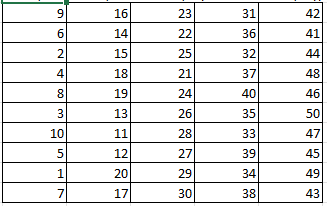
An Excel 365 formula that takes values 1-50, aligns them into columns organized in intervals of 10 (1-10,11-20,21-30, etc.), and by refreshing the spreadsheet, sorts EACH of the columns randomly: =LET(x,SORTBY(SEQUENCE(50),RANDARRAY(50)),WRAPCOLS(SORTBY(x,CEILING(x,10)),10))

An Excel 365 formula that takes values 1-50, aligns them into columns organized in intervals of 10 (1-10,11-20,21-30, etc.), and by refreshing the spreadsheet, sorts EACH of the columns randomly:

=LET(x,SORTBY(SEQUENCE(50),RANDARRAY(50)),WRAPCOLS(SORTBY(x,CEILING(x,10)),10))
Abbott Katz (@abbottkatz) 's Twitter Profile Photo

An Excel 365 formula for repeating a sequence of numbers x times, e.g. 1-50 10 times each, resulting in 1,1,1,...2,2,2..etc: =TOCOL(SEQUENCE(50)*SEQUENCE(,10,1,0)) To bundle the results in sequences of 1-50, 1-50, etc.: =TOCOL(SEQUENCE(50)*SEQUENCE(,10,1,0),,1)

Abbott Katz (@abbottkatz) 's Twitter Profile Photo

This Excel 365 formula in B7: =RANDARRAY(10,10,1,50,1) will form a matrix of 10 rows/10 columns with random values falling between 1 and 50, and will display new values when the worksheet is refreshed. To sort the values in a parallel matrix: =WRAPCOLS(SORT(TOCOL(B7#)),10)

Abbott Katz (@abbottkatz) 's Twitter Profile Photo

An Excel 365 formula for copying a set of values x number of times, e.g. values 1-10 in C13:C22 10 times each: =TOCOL(C13:C22&A1:J1) Where A1:J1 comprise 10 empty cells. The formula also works with text, e.g. names.

Abbott Katz (@abbottkatz) 's Twitter Profile Photo

For technical reasons Excel 365's TEXTSPLIT function can only parse one cell per each instance of the formula. For a single formula for splitting text in multiple cells, e.g. text in A1:A5, you could write: =TEXTSPLIT(TEXTJOIN(" ",,A1:A5&"*")," ","*",1,,"")

Abbott Katz (@abbottkatz) 's Twitter Profile Photo

Baseball team won-loss records are sometimes expressed in a text string, e.g. WWLWLLWLLLWWL. Assuming the string is entered in cell B20 you can calculate the team's winning percentage with this Excel 365 formula: =SUM(LEN(TEXTSPLIT(B20,{"L"})))/LEN(B20)

Abbott Katz (@abbottkatz) 's Twitter Profile Photo

Reality check: I asked ChatGPT about Abbott Katz: "I'm sorry, but I don't have any information about a person named Abbott Katz in my database. It's possible that the person you're referring to is not well-known or has not made significant contributions to a particular field..."

Abbott Katz (@abbottkatz) 's Twitter Profile Photo

An Excel 365 formula for generating x values in the Fibonacci series, e.g., the first 12: 1. Set Calculation options to Enable iterative calculation (File>Options>Formula). 2. Enter 0 and 1 in A1 and A2 respectively. 3. In A3 enter: =A1:A10+A2:A11

Abbott Katz (@abbottkatz) 's Twitter Profile Photo

An Excel 365 formula for copying values (say in A1:A10) x number of times, where the number of times is posted to B1: =--TOCOL(A1:A10&EXPAND("",,B1,""))

Abbott Katz (@abbottkatz) 's Twitter Profile Photo

You're invited to my two-session webinar on Excel's Dynamic Array Functions and Formulas August 16-17, both days scheduled for 10:00am-1:00pm EDT (3pm-6pm in London). Price: a modest $99. To register: lnkd.in/eV8dK7GE For more information: [email protected]

Abbott Katz (@abbottkatz) 's Twitter Profile Photo

Re your description today of Gaza as a "tightly packed area": perhaps, but consider these population densities, in persons per sq. kilomoter: Manhattan: 28,154 Paris: 20,000 Brooklyn: 14,917 Bronx: 13,482 Queens: 8,542 Gaza: 6300