JavaScript for PHP Developers (@jsforphp) 's Twitter Profile
JavaScript for PHP Developers

@jsforphp

ID: 1443207380712439815

calendar_today29-09-2021 13:34:05

119 Tweet

313 Followers

654 Following

Alex Makhaev (@mankms) 's Twitter Profile Photo

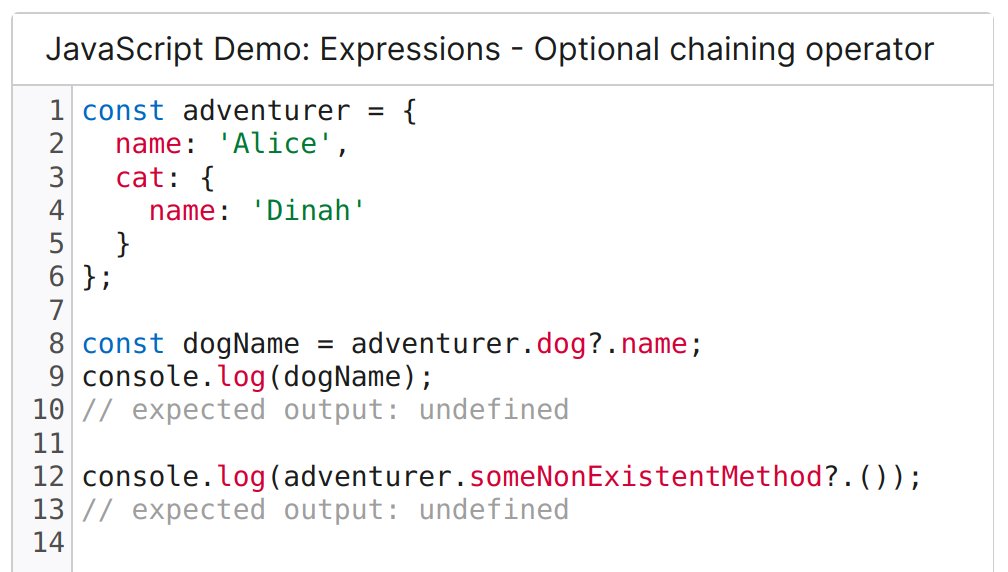
JavaScript: The optional chaining operator (?.) accesses an object's property or calls a function. If the object is undefined or null, it returns undefined instead of throwing an error. developer.mozilla.org/en-US/docs/Web…

JavaScript: The optional chaining operator (?.) accesses an object's property or calls a function. If the object is undefined or null, it returns undefined instead of throwing an error.

developer.mozilla.org/en-US/docs/Web…
Cory House (@housecor) 's Twitter Profile Photo

Why render React Server Components? Performance. 1. Faster fetches. The server typically has a faster internet connection than your users.πŸ’¨ 2. Fetches start sooner (no waiting for JS to parse and render). ⏰ 3. Less JS. React server components add no JS to the bundle. πŸ”₯

Wes Bos (@wesbos) 's Twitter Profile Photo

πŸ”₯ Format large numbers in your JavaScript with numeric separators. const milly = 1_000_000; This doesn't affect how the number works or is displayed - just helpful for reading large values quickly.

Matt Pocock (@mattpocockuk) 's Twitter Profile Photo

πŸ”₯ TypeScript Tip πŸ”₯ Creating a Context in React can be pretty annoying in TypeScript. Here's my method for keeping things typesafe, minimizing use of 'as', and also ensuring folks use your custom hooks, instead of useContext.

Wes Bos (@wesbos) 's Twitter Profile Photo

Mitosis is really neat - write your components in mitosis JSX and it will generate the equivalent React/Svelte/Vue/+more component code. Extremely helpful for large organizations that need to share components / design systems across frameworks mitosis.builder.io/?outputTab=E4U…

Cory House (@housecor) 's Twitter Profile Photo

Problem: You want to support internationalization. You want autocomplete support for translated strings. You want type safety to ensure translations are available for all languages. Solution: Use TypeScript. Use functions for strings that need placeholders for dynamic content.

Problem: 
You want to support internationalization.
You want autocomplete support for translated strings.
You want type safety to ensure translations are available for all languages.

Solution:
Use TypeScript. Use functions for strings that need placeholders for dynamic content.
Cory House (@housecor) 's Twitter Profile Photo

A common TypeScript mistake I see in React code reviews: Needless useState type arguments. If there's a default, the type can typically be inferred.

A common TypeScript mistake I see in React code reviews: Needless useState type arguments.

If there's a default, the type can typically be inferred.
Avindra Fernando (@avindrafernando) 's Twitter Profile Photo

❌ Using Boolean to filter `undefined` from a list? Prefer using a type guard which returns a type predicate βœ… instead. #typescript

❌ Using Boolean to filter `undefined` from a list? 

Prefer using a type guard which returns a type predicate βœ… instead.

#typescript
Kent C. Dodds ⚑ (@kentcdodds) 's Twitter Profile Photo

express is great. It may not be the most modern solution and I'm definitely eyeing alternatives, but it's amazing how useful it's been for the last decade. It's been my companion for as long as I've used node.

Matt Pocock (@mattpocockuk) 's Twitter Profile Photo

My answer: TypeScript's goal is not to be type-safe. It's to provide a type system to describe enough of JavaScript to be useful.

Adam Wathan (@adamwathan) 's Twitter Profile Photo

Incredible post on optimizing JavaScript for performance β€” so many neat little surprises in here: romgrk.com/posts/optimizi…

Usman S. πŸ‡΅πŸ‡Έ (@maxprogramming1) 's Twitter Profile Photo

πŸ“’ JavaScript Trick - Use the URL constructor When you want to add some query parameters to your URL, use the built-in URL constructor in JavaScript instead of template literals. This results in more readable and less error-prone code as you don't need to manually write ? and &

πŸ“’ JavaScript Trick - Use the URL constructor

When you want to add some query parameters to your URL, use the built-in URL constructor in JavaScript instead of template literals.

This results in more readable and less error-prone code as you don't need to manually write ? and &