Saran Ilango (@saran_ilango) 's Twitter Profile
Saran Ilango

@saran_ilango

Microsoft Dynamics 365 | Business Central

ID: 1559356609

calendar_today01-07-2013 01:26:22

739 Tweet

277 Followers

1,1K Following

Visual Studio Code (@code) 's Twitter Profile Photo

Did you know you can add a single file to your project and dramatically improve Copilot's anwers while *at the same time* reduce the size of the prompt you have to write?

Saran Ilango (@saran_ilango) 's Twitter Profile Photo

Join us at Green IO Singapore 2025 on April 16th for a concise overview of sustainability challenges in Southeast Asia's IT sector, from the AI boom to data center decarbonization, and solutions to address them. gael.duez greenio.tech/conference/14/…

Join us at Green IO Singapore 2025 on April 16th for a concise overview of sustainability challenges in Southeast Asia's IT sector, from the AI boom to data center decarbonization, and solutions to address them.  
<a href="/gaelduez/">gael.duez</a>  
greenio.tech/conference/14/…
elvis (@omarsar0) 's Twitter Profile Photo

NEW: Google announces Agent2Agent Agent2Agent (A2A) is a new open protocol that lets AI agents securely collaborate across ecosystems regardless of framework or vendor. Here is all you need to know:

Saran Ilango (@saran_ilango) 's Twitter Profile Photo

Switch models & reload responses - To regenerate GitHub Copilot responses with a different model, click the retry button below the response. Also, maintains conversation context while letting you compare outputs across models.

Saran Ilango (@saran_ilango) 's Twitter Profile Photo

How to turn on Agent mode in Visual Studio Code : 1. Open the Github Copilot Chat view 2. Sign in to your GitHub account 3. Navigate to settings and enable chat.agent.enabled 4. Select Agent in the Chat mode dropdown If the setting is not visible, reload VS Code after updating to the latest

Tibor Blaho (@btibor91) 's Twitter Profile Photo

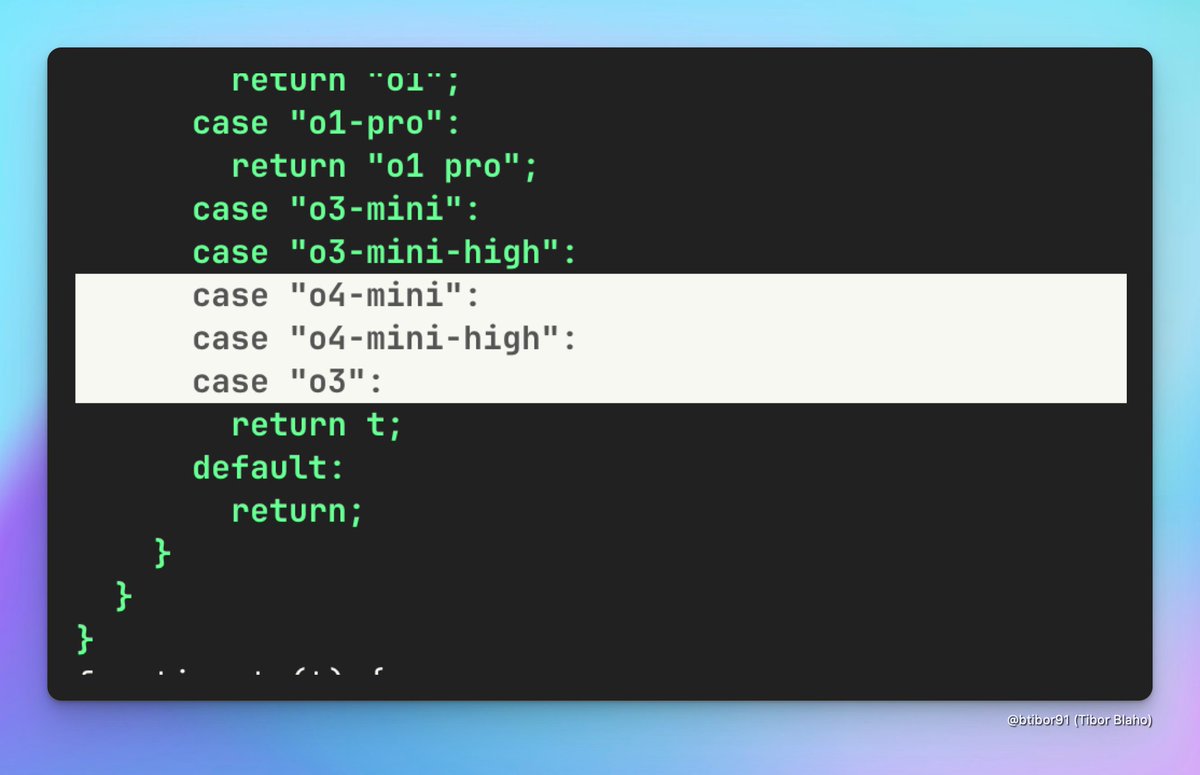
New ChatGPT web app version deployed just now (after midnight San Francisco time) adds mentions of "o4-mini", "o4-mini-high" and "o3"

New ChatGPT web app version deployed just now (after midnight San Francisco time) adds mentions of "o4-mini", "o4-mini-high" and "o3"
Min Choi (@minchoi) 's Twitter Profile Photo

Less than 24 hours ago, Google dropped Firebase Studio. Cursor AI, Lovable, Bolt, v0, deploy, all in the browser. Free. Minds are blown. 10 wild examples: 👇

Saran Ilango (@saran_ilango) 's Twitter Profile Photo

Learn how to unlock embedded #PowerBI reports in #Dynamics365 #BusinessCentral 2025 Wave 1 (v26.2) 🎥 ✅ Access in-client dashboards ✅ Power BI Connector setup ✅ Install AppSource templates

Saran Ilango (@saran_ilango) 's Twitter Profile Photo

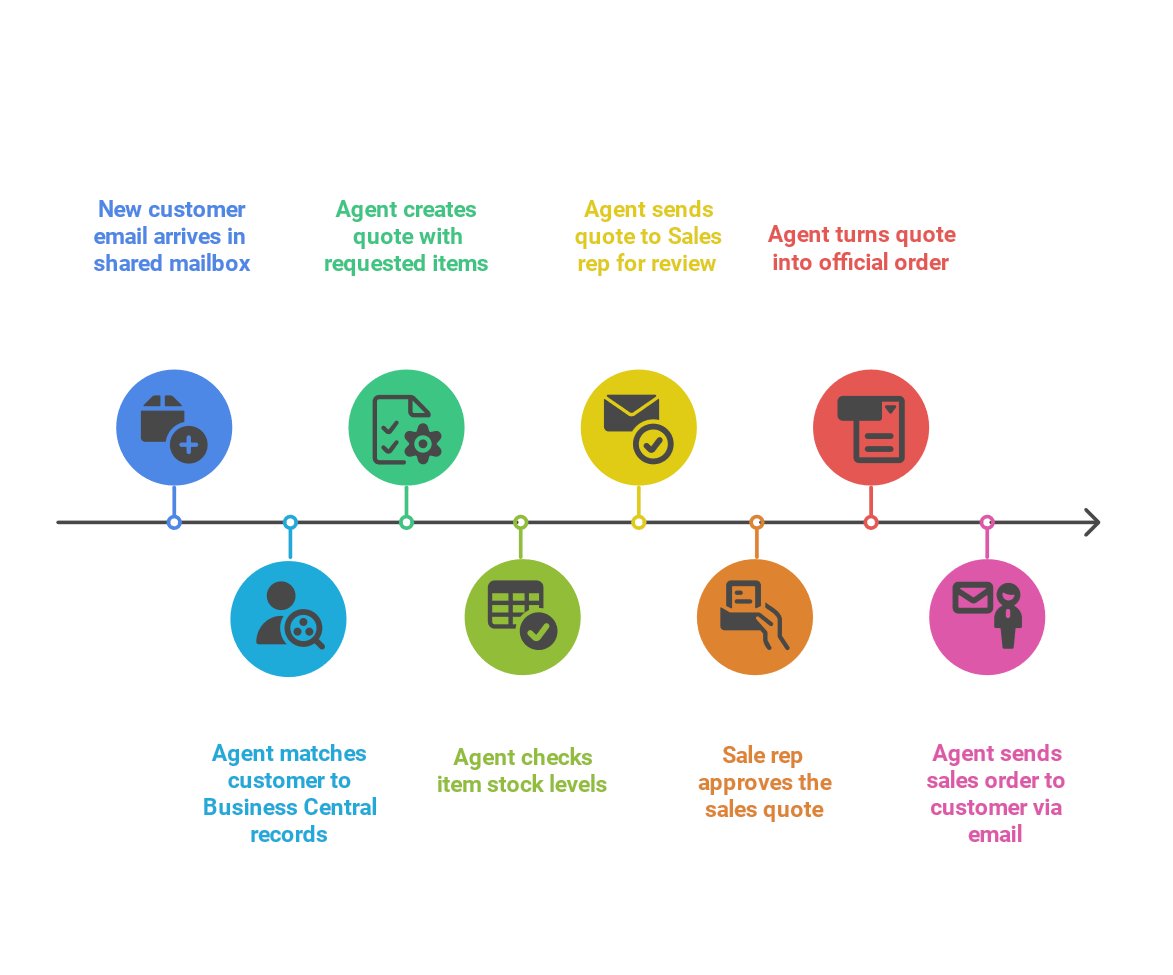
Here is the Timeline diagram of Sales Order Agent workflow in Business Central for deeper understanding. 🔹 Customer emails item requests → Sales Order Agent captures the request from a shared mailbox 🔹 Agent identifies the customer in BC based on Contact link 🔹 Drafts a

Here is the Timeline diagram of Sales Order Agent workflow in Business Central for deeper understanding.
🔹 Customer emails item requests → Sales Order Agent captures the request from a shared mailbox
 🔹 Agent identifies the customer in BC based on Contact link
 🔹 Drafts a
Josh Woodward (@joshwoodward) 's Twitter Profile Photo

The wait is over. Google Gemini App is now shipping Veo 3 *globally* for all Pro members! That means India, Indonesia, all of Europe, and more are starting to get access to create videos right now. As a member, you'll get 3 video generations per day, and that credit will replenish

Saran Ilango (@saran_ilango) 's Twitter Profile Photo

Create Sales Lines in Business Central by pasting data from Excel Whether long inquiry email or an Excel list of items and sighed at the thought of re-entering everything into Dynamics 365 Business Central? 🔹 Copy the inquiry, paste into Sales Line Suggestions. 🔹 Copilot

Saran Ilango (@saran_ilango) 's Twitter Profile Photo

Print Barcodes QR Code Labels in Business Central 1️⃣Item & Reference, instantly scannable • From Item Card / Item List you can print labels with Item No., Description, GTIN encoded as both 1D barcodes and QR codes. • From Item References / List, add Unit of Measure & Reference

Saran Ilango (@saran_ilango) 's Twitter Profile Photo

📇 New in #Dynamics365 #BusinessCentral – Create Customers, Vendors, Employees, or Bank Accounts directly from a Contact! Here’s how it works: 🔁 Use the "Create as" action on a contact to generate a linked Customer, Vendor, Employee, or Bank Account. ✔️ Contact details

Saran Ilango (@saran_ilango) 's Twitter Profile Photo

🚀 Just released a detailed demo showcasing Manus AI's capabilities in action! ✈️ Scenario: Finding the best-priced flight date between Chennai 🇮🇳 and Singapore 🇸🇬. In this step-by-step video, we deep dive into: 🔍 How Manus AI conducts comprehensive research, ⚙️

Saran Ilango (@saran_ilango) 's Twitter Profile Photo

Payables Agents in Business Central Version 26.3 - Public Preview Setup and Configuration: 🔹 Go to the Payables Agent setup page in Business Central. 🔹 Set up your Microsoft 365 email to source invoice attachments. 🔹 Test Payables Agent with provided sample invoices to

Saran Ilango (@saran_ilango) 's Twitter Profile Photo

Sales Order Agent Demo | Microsoft Dynamics 365 Business Central Demo Highlights and Steps: **Activating Sales Order Agent:** 1. Go to Business Central. 2. Select "Sales Order Agent" and activate it. 3. Enter the email account to monitor incoming information. 4. Complete

Saran Ilango (@saran_ilango) 's Twitter Profile Photo

🔍 Copilot Tips in Business Central - Copy Copilot Summary Streamline insights by copying the Copilot Summary from the Customers, Vendors, or Items page in Business Central to save or share valuable information. #copilot #businesscentral #msdyn365bc