オカピMACHINEGUN (@fuffyfaf) 's Twitter Profile
オカピMACHINEGUN

@fuffyfaf

ID: 2970552815

calendar_today09-01-2015 22:54:37

18,18K Tweet

217 Followers

294 Following
オカピMACHINEGUN (@fuffyfaf) 's Twitter Profile Photo

I have never seen anyone play tekken without getting viscerally angry. of any fighting game I've played it's like tekken makes people the most upset

オカピMACHINEGUN (@fuffyfaf) 's Twitter Profile Photo

Live service video games all rely on central servers that can't remain online forever. When those central servers shut down, the live service games they host cannot be played ever again. If you live in the EU, sign this petition to #StopKillingGames. eci.ec.europa.eu/045/public/

オカピMACHINEGUN (@fuffyfaf) 's Twitter Profile Photo

#StopKillingGames The rate of new signatures coming in is slowing down a lot, keep pushing! We need as many signatures as possible to make up for invalidated signatures, which might be as many as 25% of all signatures collected!

#StopKillingGames
The rate of new signatures coming in is slowing down a lot, keep pushing! We need as many signatures as possible to make up for invalidated signatures, which might be as many as 25% of all signatures collected!
オカピMACHINEGUN (@fuffyfaf) 's Twitter Profile Photo

This is coming right after Microsoft officially ended security updates for all main branches of Windows 10 in order to incentivize users to switch to Windows 11, as well as the confirmation that Windows 11 was created in part by AI.

オカピMACHINEGUN (@fuffyfaf) 's Twitter Profile Photo

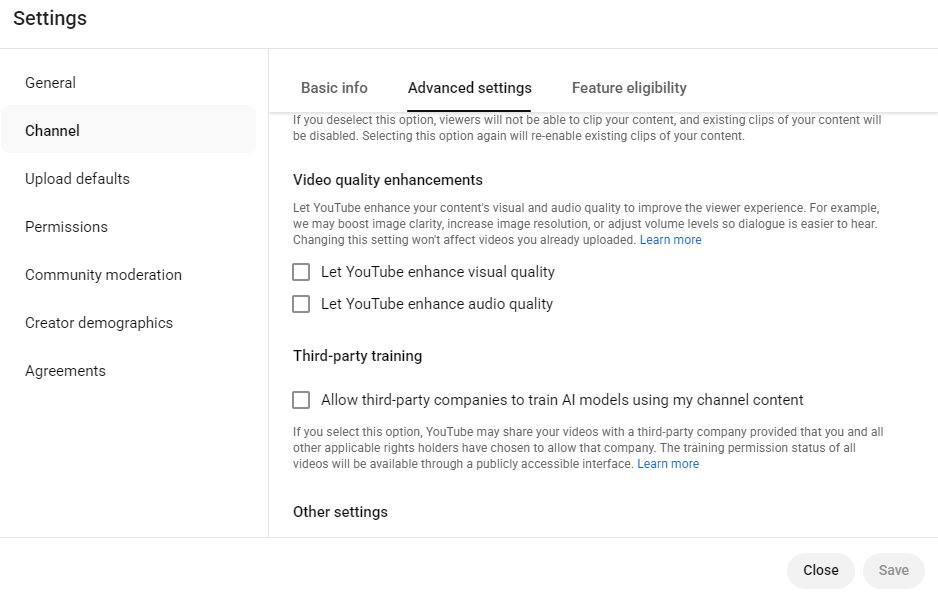
KennyLauderdale Youtube's AI "enhancements" are already affecting videos. youtube.com/watch?v=2HY-nR… If you're a content creator, do the following to turn them off: Go to Youtube Studio, then Settings, then Channel, then Advanced Settings. From there, make sure "video quality enhancements" are off.
<a href="/KennyLauderdal3/">KennyLauderdale</a> Youtube's AI "enhancements" are already affecting videos.
youtube.com/watch?v=2HY-nR…
If you're a content creator, do the following to turn them off:
Go to Youtube Studio, then Settings, then Channel, then Advanced Settings. From there, make sure "video quality enhancements" are off.