Coach_Taya (@coxncoach) 's Twitter Profile
Coach_Taya

@coxncoach

Mom... coach... coxn... drinker of wine.

ID: 1315139252

calendar_today29-03-2013 20:21:27

684 Tweet

108 Takipçi

380 Takip Edilen

Chris Hayes (@chrislhayes) 's Twitter Profile Photo

Pin this tweet: There will be GOP congressional candidates in 2022 whose campaign slogan will be some version of "Storm the Capitol"

Meredith Schamun (@meredithschamun) 's Twitter Profile Photo

We sent a “no” email to a recruit whose position has been filled. She responded with a thank you and took the opportunity to tell us about a few of her talented teammates, in case we are recruiting their positions. THINGS WE NEED MORE OF ❤️❤️

Mike Birbiglia (@birbigs) 's Twitter Profile Photo

So baffled by the handful of people on here who are in complete denial of the pandemic. To the "gotta live my life" crew: all I ask is that when your grandchildren ask u what you did during the pandemic that killed 500k+ Americans that you say, "I pretended it wasn't happening."

Dionne Warwick (@dionnewarwick) 's Twitter Profile Photo

I finally listened to Love Story (Taylor’s Version), and I want to be friends. Taylor Swift do you have room for one more friend? For incentive, I just learned how to send animated texts!


Anna Klassen (@annajklassen) 's Twitter Profile Photo

Me: I should stay off social media during the work day. Also me: Do I want to go on Instagram and feel ugly, go on Zillow and feel poor, go on TikTok and feel old, or go on Twitter and feel angry? I know: All of them in rapid succession for hours on end!

Bill Henley (@billhenleyusa) 's Twitter Profile Photo

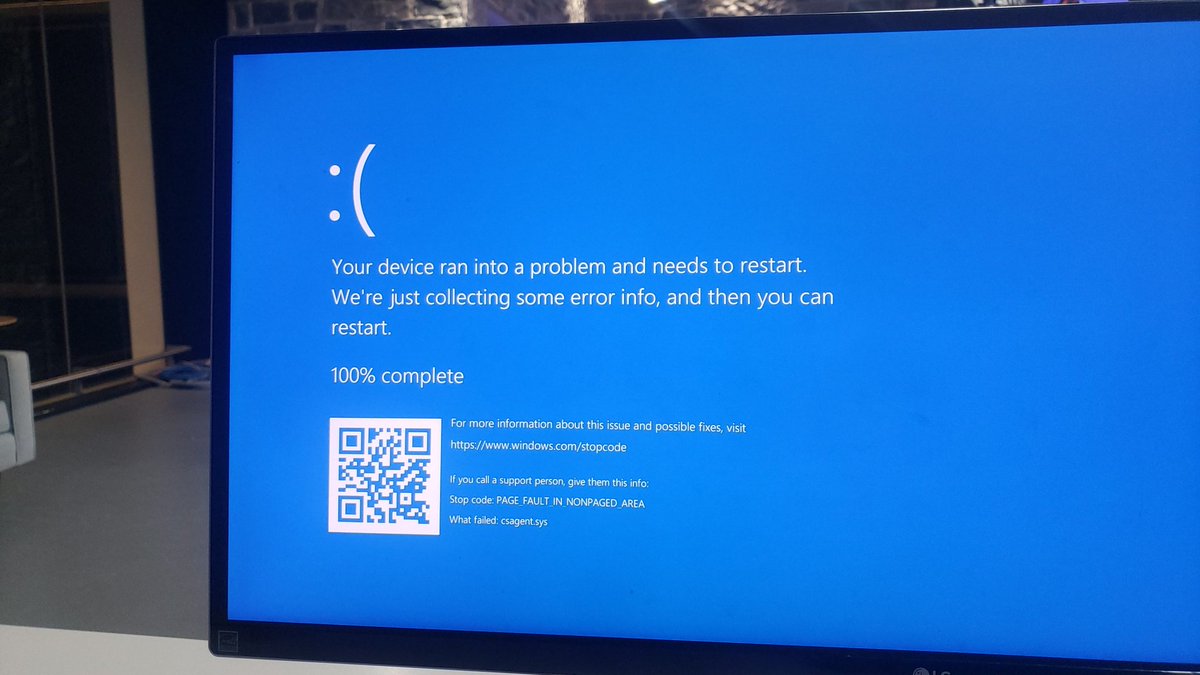
Experiencing a BSOD due to CrowdStrike update? Here's a quick fix: 1. Boot into Safe Mode (press F8 repeatedly on restart). 2. Open Command Prompt. 3. Navigate to `C:\Windows\System32\drivers\CrowdStrike`. 4. Delete the file matching `C-00000291*.sys`. 5. Restart normally.

Experiencing a BSOD due to CrowdStrike update? Here's a quick fix:

1. Boot into Safe Mode (press F8 repeatedly on restart).
2. Open Command Prompt.
3. Navigate to `C:\Windows\System32\drivers\CrowdStrike`.
4. Delete the file matching `C-00000291*.sys`.
5. Restart normally.