Andrei Bacalu (@bacalu_andrei) 's Twitter Profile
Andrei Bacalu

@bacalu_andrei

Motion designer exploring, learning & teaching the craft

ID: 1617671750

linkhttps://andreibacalu15.myportfolio.com/ calendar_today24-07-2013 12:33:44

56 Tweet

15 Takipçi

96 Takip Edilen
Andrei Bacalu (@bacalu_andrei) 's Twitter Profile Photo

5 Show / Hide Shortcuts in After Effects Keyframes, Effects, Properties, groups and expressions For more shortcuts, check out my YouTube playlist here: youtube.com/@andreibacalu15 #AfterEffects #MotionDesign #AEshortcuts #AEworkflow #AfterEffectsTutorial #CreativeLearning

Andrei Bacalu (@bacalu_andrei) 's Twitter Profile Photo

Control your anchor and position yourself exactly where you want All you need is After Effects and these next shortcuts: #AfterEffects #MotionDesign #AEshortcuts #AEworkflow #AfterEffectsTutorial #CreativeLearning

Andrei Bacalu (@bacalu_andrei) 's Twitter Profile Photo

Effortlessly navigate your layers with these handy shortcuts! They're a lifesaver when managing tons of layers—aka, most of the time. 😉 YouTube playlist here: youtube.com/@andreibacalu15 #AfterEffects #MotionDesign #AEshortcuts #AEworkflow #AfterEffectsTutorial #CreativeLearning

Andrei Bacalu (@bacalu_andrei) 's Twitter Profile Photo

Have you ever wished to control time? Try these shortcuts and see for yourself: YouTube playlist here: youtube.com/@andreibacalu15 #aftereffects #aeshortcuts #aetips #learningae #aeworkflow #motiondesign #motiongraphics

Andrei Bacalu (@bacalu_andrei) 's Twitter Profile Photo

Tired of hunting for keyframes? Jump to them with one shortcut. YouTube playlist here: youtube.com/@andreibacalu15 #aftereffects #aeshortcuts #aetips #learningae #aeworkflow #motiondesign #motiongraphics

Andrei Bacalu (@bacalu_andrei) 's Twitter Profile Photo

Too many groups cluttering your view? Shrink them all down with one shortcut. P.S. Repost this ♻️ Someone out there might use it! #aftereffects #aeshortcuts #aetips #learningae #aeworkflow #motiondesign #motiongraphics

Andrei Bacalu (@bacalu_andrei) 's Twitter Profile Photo

Ae Shortcuts #24: Preferences & Shortcuts Editor Here’s the fastest way to access them: #aftereffects #aeshortcuts #aetips #learningae #aeworkflow #motiondesign #motiongraphics

Andrei Bacalu (@bacalu_andrei) 's Twitter Profile Photo

Replace Layers & Switch Blending Modes Quickly These are the most useful shortcuts I have come across in a while: I have to admit, cycling through blending modes by clicking was always a pain for me. #aftereffects #aeshortcuts #aetips #learningae #aeworkflow #motiondesign

Andrei Bacalu (@bacalu_andrei) 's Twitter Profile Photo

Are you tired of previewing everything just to check the audio? If you’ve got a slow computer like me, I’m guessing the answer is yes. Here’s how to isolate sound quickly and save some time: #aftereffects #aeshortcuts #aetips #learningae #aeworkflow #motiondesign #eyecandy

Andrei Bacalu (@bacalu_andrei) 's Twitter Profile Photo

Hate wasting time in After Effects? Cut it down with these: • Control(Cmd) + Alt(Option) + N : New Project • Control(Cmd) + O : Open Project • Control(Cmd) + Alt(Option) + Shift + N : New Folder #aftereffects #aeshortcuts #aetips #learningae #aeworkflow #motiondesign

Andrei Bacalu (@bacalu_andrei) 's Twitter Profile Photo

The fast way to reach your tools Put them on the right shelf: I don’t use these tools that often, but I know many of you do! Which of these do you use most often? #aftereffects #aeshortcuts #aetips #learningae #aeworkflow #motiondesign #motiongraphics

Andrei Bacalu (@bacalu_andrei) 's Twitter Profile Photo

Panels cluttering your view? Here’s how to clear them in seconds: #aftereffects #aeshortcuts #aetips #learningae #aeworkflow #motiondesign #motiongraphics

Andrei Bacalu (@bacalu_andrei) 's Twitter Profile Photo

You can't truly master any craft without knowing how to command your workspace. Here’s some help with that: #aftereffects #aeshortcuts #aetips #learningae #aeworkflow #motiondesign #motiongraphics

Andrei Bacalu (@bacalu_andrei) 's Twitter Profile Photo

Lost in After Effects? Don’t overthink it. This shortcut takes you straight to help: #aftereffects #aeshortcuts #aetips #learningae #aeworkflow #motiondesign #motiongraphics

Andrei Bacalu (@bacalu_andrei) 's Twitter Profile Photo

Ready to level up your After Effects navigation skills? These 3 shortcuts are all you need to get started: #aftereffects #aeshortcuts #aetips #learningae #aeworkflow #motiondesign #motiongraphics

Andrei Bacalu (@bacalu_andrei) 's Twitter Profile Photo

Ready to preview smarter, not harder? These 3 shortcuts are a major help. #aftereffects #aeshortcuts #aetips #learningae #aeworkflow #motiondesign #motiongraphics

Andrei Bacalu (@bacalu_andrei) 's Twitter Profile Photo

5 essential shortcuts for mastering 3D in After Effects. Miss these, and you’re missing out on serious efficiency. #aftereffects #aeshortcuts #aetips #learningae #aeworkflow #motiondesign #motiongraphics

Andrei Bacalu (@bacalu_andrei) 's Twitter Profile Photo

New comp? No problem. These shortcuts will make your setup a breeze. P.S. Give this a share ♻️ Your network might dig it! #aftereffects #aeshortcuts #aetips #learningae #aeworkflow #motiondesign #motiongraphics

Andrei Bacalu (@bacalu_andrei) 's Twitter Profile Photo

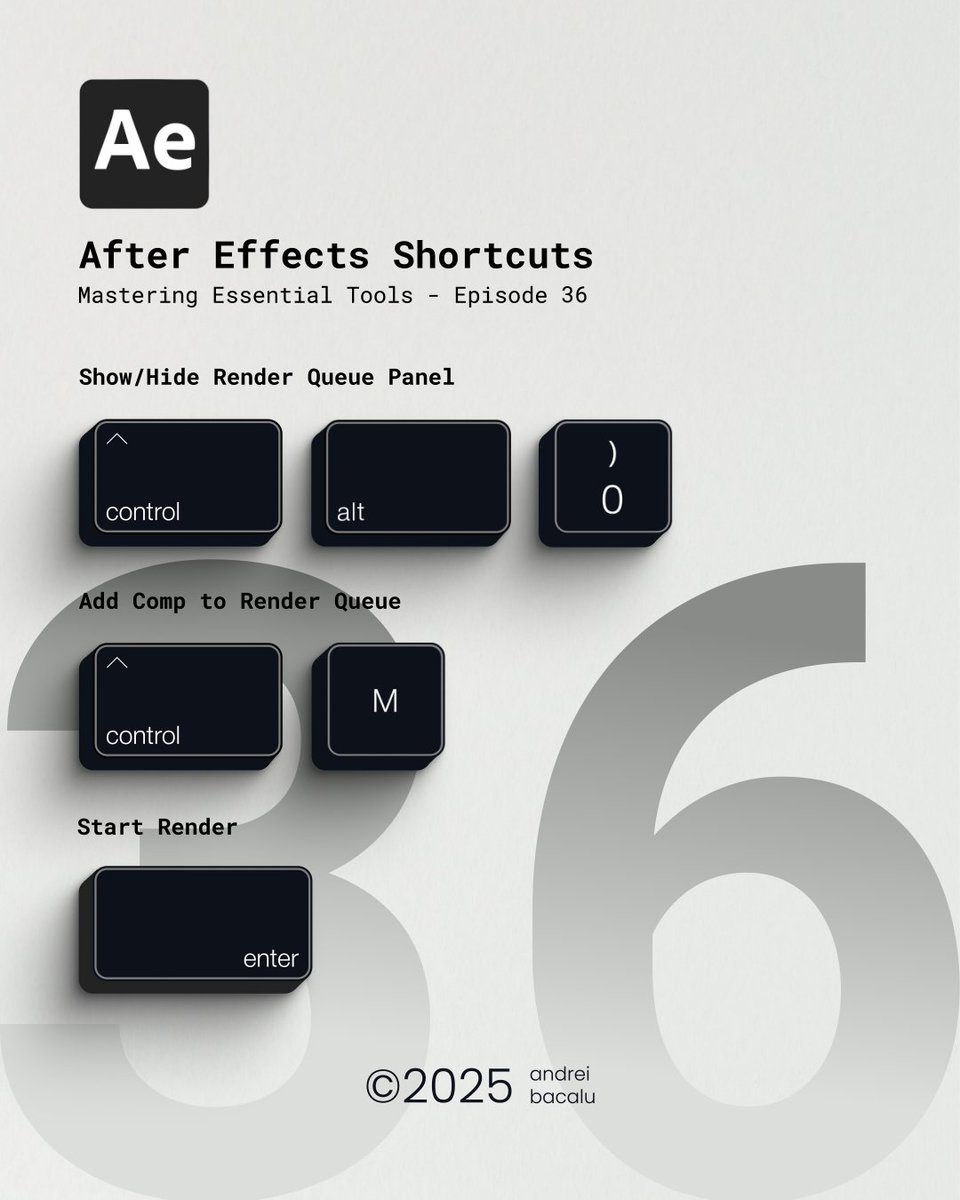
3 Shortcuts every motion designer needs for rendering. Once you use them, you’ll never go back. Repost & Help a fellow creative learner ♻️ Thank you! #aftereffects #aeshortcuts #aetips #learningae #aeworkflow #motiondesign #motiongraphics

3 Shortcuts every motion designer needs for rendering. Once you use them, you’ll never go back.
Repost & Help a fellow creative learner ♻️ Thank you!

#aftereffects #aeshortcuts #aetips #learningae #aeworkflow #motiondesign #motiongraphics
Andrei Bacalu (@bacalu_andrei) 's Twitter Profile Photo

One shortcut to rule them all The one you need to use constantly…I know you know it. These shortcuts should have been in the first episode. #aftereffects #aeshortcuts #aetips #learningae #aeworkflow #motiondesign #motiongraphics
