Rav (@raveges) 's Twitter Profile
Rav

@raveges

ID: 2777113109

linkhttps://www.youtube.com/c/Ravege calendar_today19-09-2014 21:44:17

10,10K Tweet

228 Takipçi

386 Takip Edilen

nutty (@nuttylmao) 's Twitter Profile Photo

If you’re a streamer that edits their VODs into high quality YouTube videos, this is HUGE. You can finally record multi-track videos — right in OBS — thanks to a new plugin from Aitum You can stream with all your fancy alerts and overlays *while* recording a clean copy of

naniwazuni 🧚🍂 (@naniwa_zuni) 's Twitter Profile Photo

So You Wanna Learn DaVinci Resolve #1: getting the dang program and setting up your project settings First video of several I'll be making with some really basic tips for working in Resolve, figured this would be useful after seeing the CapCut changes this week

COMPREADY (@comp_ready) 's Twitter Profile Photo

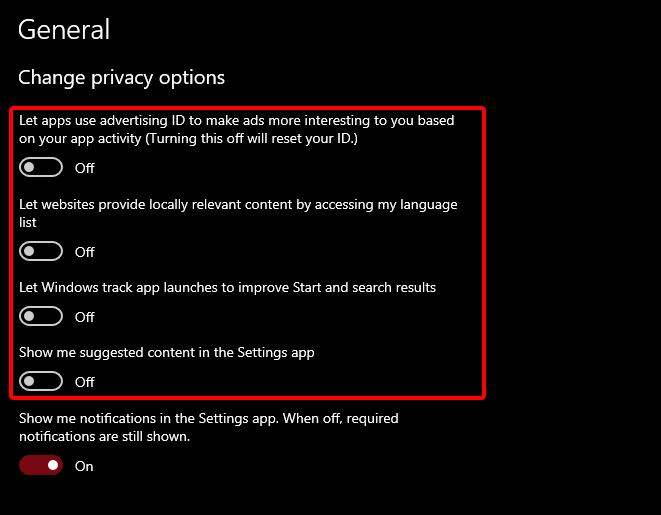
🚨 PROTECT YOUR PRIVACY 🚨 Disable these 4 privacy settings on Windows to increase FPS and stop Windows from taking your information 🙌

🚨 PROTECT YOUR PRIVACY 🚨

Disable these 4 privacy settings on Windows to increase FPS and stop Windows from taking your information 🙌
COMPREADY (@comp_ready) 's Twitter Profile Photo

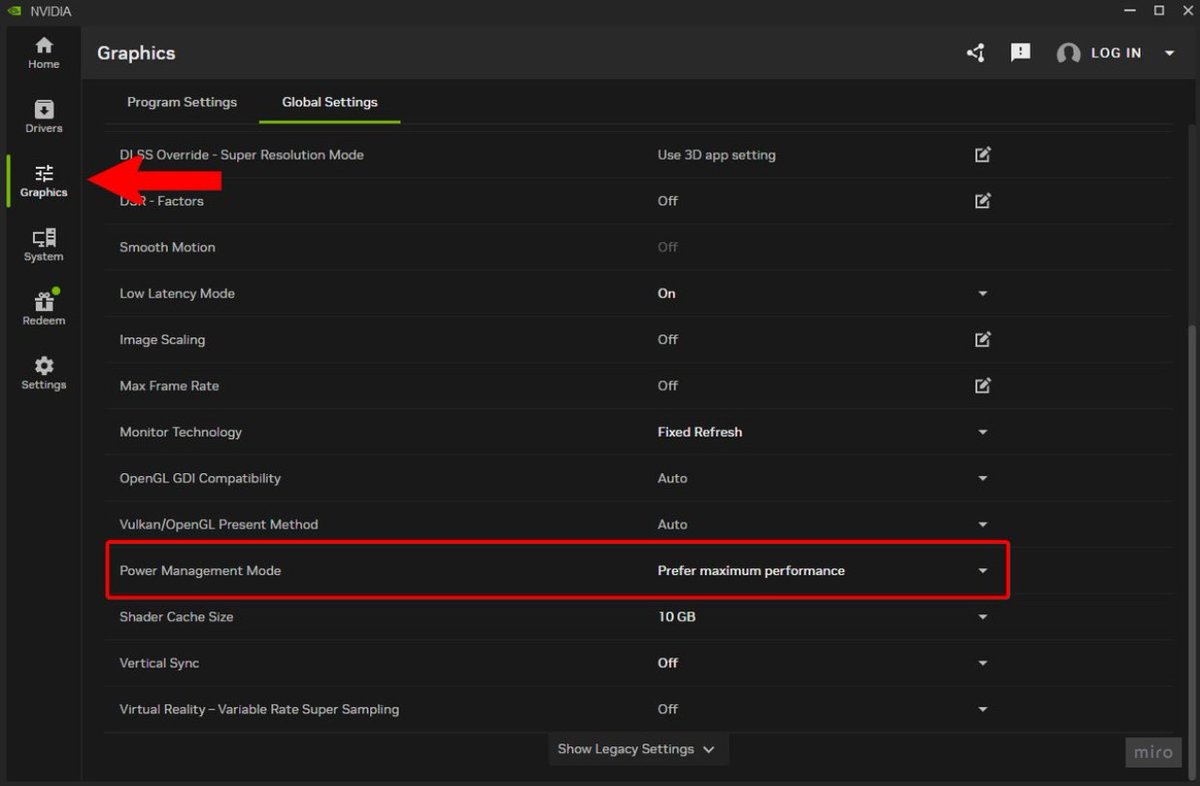
🚨 INSTANT FPS BOOST 🚨 Open the NVIDIA App and go to "Graphics" then "Global Settings", next find "Power Management Mode" and set this to "Prefer Maximum Performance" 🙌

🚨 INSTANT FPS BOOST 🚨

Open the NVIDIA App and go to "Graphics" then "Global Settings", next find "Power Management Mode" and set this to "Prefer Maximum Performance" 🙌
COMPREADY (@comp_ready) 's Twitter Profile Photo

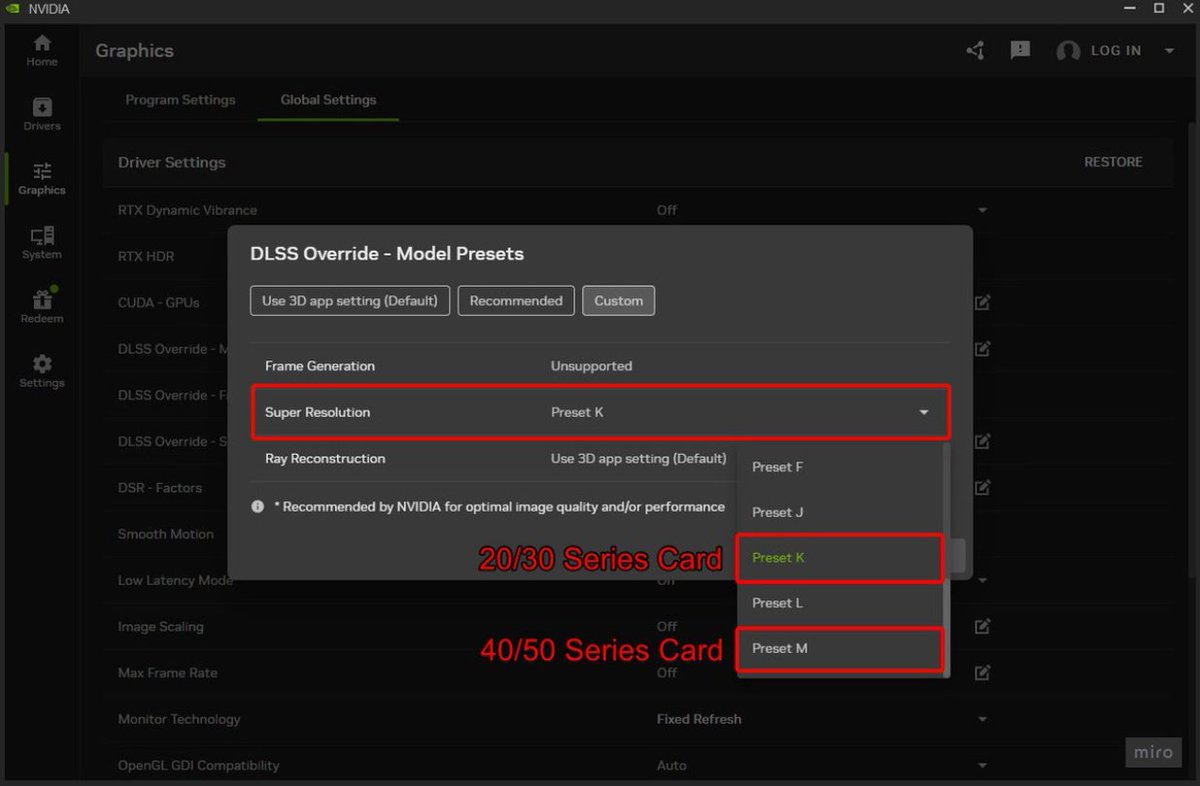
NVIDIA Users: Forcing your DLSS to a Preset can you give a MASSIVE FPS boost Open the NVIDIA App and go to "Graphics" then "Global Settings", next find "DLSS Override - Model Presets" and set this to "Custom", then under "Super Resolution" switch to "Preset K" if you have a

NVIDIA Users: Forcing your DLSS to a Preset can you give a MASSIVE FPS boost

Open the NVIDIA App and go to "Graphics" then "Global Settings", next find "DLSS Override - Model Presets" and set this to "Custom", then under "Super Resolution" switch to "Preset K" if you have a
Fabiolinho (@fabiolinho97) 's Twitter Profile Photo

Here are the BEST OBS Replay Buffer settings for smooth gameplay + instant highlights: ✅ Encoder: NVENC ✅ Preset: Good Quality or Fastest if GPU limited ✅ Rate Control: CQP ✅ CQ Level: 18–22 ✅ Psycho Visual Tuning: On Join my Discord for the best Pc Optimization services⬇️

Here are the BEST OBS Replay Buffer settings for smooth gameplay + instant highlights:

✅ Encoder: NVENC
✅ Preset: Good Quality or Fastest if GPU limited
✅ Rate Control: CQP
✅ CQ Level: 18–22
✅ Psycho Visual Tuning: On

Join my Discord for the best Pc Optimization services⬇️
■ (@faisalpixel) 's Twitter Profile Photo

أحد محبين لعبة رزدنت ايفل 3 قرر يسوي مود يعدل ريميك اللعبة بحيث يكون اعادة تخيل كاملة للريميك على PC اسم المود : RESIDENT EVIL 3 LAST ESCAPE المود يبقدم :- - مناطق أكثر قابلة للعبة مثل برج الساعة و مركز الشرطة و غيرها الكثير - مراحل اكبر و معاد تصميمها - مواجهات أكثر

أحد محبين لعبة رزدنت ايفل 3 قرر يسوي مود يعدل ريميك اللعبة بحيث يكون اعادة تخيل كاملة للريميك على PC 
 
اسم المود : 
RESIDENT EVIL 3 LAST ESCAPE
المود يبقدم :- 

 - مناطق أكثر قابلة للعبة مثل برج الساعة و مركز الشرطة و غيرها الكثير 

- مراحل اكبر و معاد تصميمها 

- مواجهات أكثر
Valorant Updates (@valorantupdated) 's Twitter Profile Photo

Quick & Easy fix for the recent Valorant stutters 😄 It is recommended to do this every patch for a smoother experience in-game.

Resident Evil (@re_games) 's Twitter Profile Photo

Mouse sensitivity settings for each character can be changed via Camera in the Options menu. First, select Grace’s or Leon’s Camera. Once selected, a menu with more detailed settings will open. From there, you can adjust the camera speed of first-person and third-person

Mouse sensitivity settings for each character can be changed via Camera in the Options menu. First, select Grace’s or Leon’s Camera. Once selected, a menu with more detailed settings will open. From there, you can adjust the camera speed of first-person and third-person
NikTek (@niktekofficial) 's Twitter Profile Photo

Disabling Resizable BAR completely fixed the stuttering issues I find it weird how that was the cause of this whole issue, re-BAR is supposed to make games perform better, not worse. If you're on PC and are experiencing stuttering issues in RE9, try disabling Resizable BAR