🛡️ WP Ultimate Security (@wpusecurity) 's Twitter Profile
🛡️ WP Ultimate Security

@wpusecurity

Lightweight, privacy-first WordPress security

👉 Check out: w.org/plugins/ultima…

ID: 1937239264049123328

linkhttps://wpultimatesecurity.com/ calendar_today23-06-2025 20:00:22

178 Tweet

12 Followers

69 Following

🛡️ WP Ultimate Security (@wpusecurity) 's Twitter Profile Photo

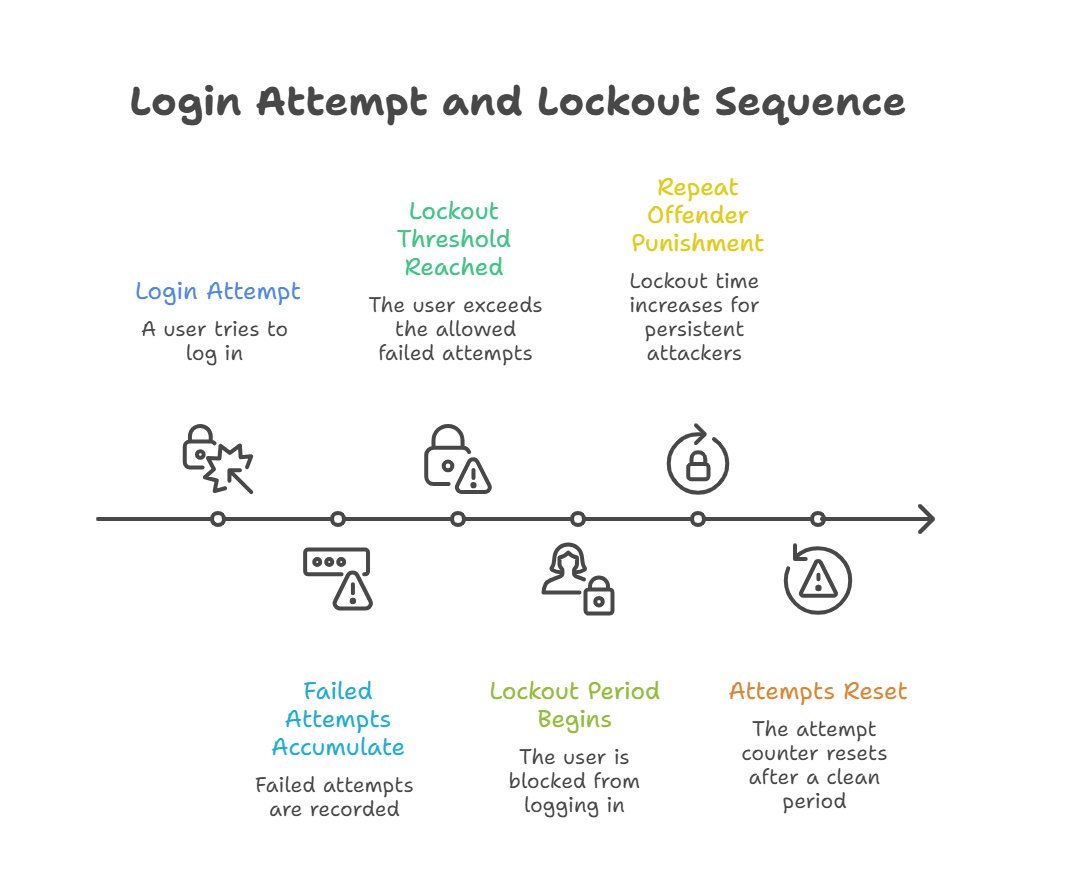
Ever wonder what happens behind the scenes when a login attempt fails? The infographic breaks down the Login Attempt and Lockout Sequence. A vital line of defense for any #WordPress site

Ever wonder what happens behind the scenes when a login attempt fails?  The infographic breaks down the Login Attempt and Lockout Sequence. A vital line of defense for any #WordPress site
🛡️ WP Ultimate Security (@wpusecurity) 's Twitter Profile Photo

Standard password protection is often the weakest defense against automated attacks. Our latest guide provides a step-by-step walkthrough for implementing 2FA for every user role: wpultimatesecurity.com/blog/secure-wo…

🛡️ WP Ultimate Security (@wpusecurity) 's Twitter Profile Photo

Our plugin monitors your current security level. See which security features are active, which are off, and how much each step will improve your security score before you enable it

🛡️ WP Ultimate Security (@wpusecurity) 's Twitter Profile Photo

Most WordPress site owners protect their admin account only but what about the members who register on your site every day? 🔗 Read the full article→ wpultimatesecurity.com/blog/how-to-en…

🛡️ WP Ultimate Security (@wpusecurity) 's Twitter Profile Photo

Security is invisible until something goes wrong. So, we built this dashboard so you can see what’s happening on your WordPress site. It’s great to see a neat and clean UI with green signs

Security is invisible until something goes wrong. So, we built this dashboard so you can see what’s happening on your WordPress site. It’s great to see a neat and clean UI with green signs
🛡️ WP Ultimate Security (@wpusecurity) 's Twitter Profile Photo

🪄 WordPress Tip of the Day #23 Email OTP adds a quick second layer for WordPress login 2FA, but only if your email is secure too. ✅ Enable 2FA for your Email account too ✅ Save Backup codes from email settings

🛡️ WP Ultimate Security (@wpusecurity) 's Twitter Profile Photo

Ultimate Security makes WordPress security easy. The dashboard gives you a clear view of your current protection, and you can take action accordingly.

Ultimate Security makes WordPress security easy. The dashboard gives you a clear view of your current protection, and you can take action accordingly.
🛡️ WP Ultimate Security (@wpusecurity) 's Twitter Profile Photo

WordPress login page has zero protection by default. These five login security practices every site owner should have. Each one blocks a different type of attack. Together, they make your login page a very hard target. Read full guide 👇 wpultimatesecurity.com/blog/wordpress…

🛡️ WP Ultimate Security (@wpusecurity) 's Twitter Profile Photo

The ultimate view for a secure WordPress site💻 From tracking failed login attempts to handling plugin updates, we’ve put everything into one dashboard. Keep your security score in the green and focus on your business.

The ultimate view for a secure WordPress site💻
From tracking failed login attempts to handling plugin updates, we’ve put everything into one dashboard. Keep your security score in the green and focus on your business.
🛡️ WP Ultimate Security (@wpusecurity) 's Twitter Profile Photo

We broke down the 15 steps that matter the most and 12 best practices that add bonus value for WordPress Security. → Read the Ultimate WordPress Security Checklist here: wpultimatesecurity.com/blog/wordpress… #WordPressTips #WordPress #InfoSec #WordPressSecurity

🛡️ WP Ultimate Security (@wpusecurity) 's Twitter Profile Photo

We designed the Ultimate Security Dashboard to be the visual heart of your site’s protection. Making it easy for you and your team to spot threats and a specific kind of relief that comes from seeing a green "Good" status on your screen.

We designed the Ultimate Security Dashboard to be the visual heart of your site’s protection. Making it easy for you and your team to spot threats and a specific kind of relief that comes from seeing a green "Good" status on your screen.
🛡️ WP Ultimate Security (@wpusecurity) 's Twitter Profile Photo

Password is the first step for digital security. Make sure your WordPress site is fully protected with strong password rules including 16+ length, upper and lower case with special characters and numbers.

🛡️ WP Ultimate Security (@wpusecurity) 's Twitter Profile Photo

🪄 WordPress Tip of the Day #24 If your password leaks in a data breach, your WordPress site is already at risk. 2FA blocks the second step. ✅ Use an authenticator app ✅ Store backup codes safely Enable 2FA on your WordPress site now #WordPress #2FA

🛡️ WP Ultimate Security (@wpusecurity) 's Twitter Profile Photo

You just head into the settings, toggle the login limit, and just like that, you've made it ten times harder for bad bots. See the whole process in a nutshell

🛡️ WP Ultimate Security (@wpusecurity) 's Twitter Profile Photo

5 Cloudflare WAF rules that block aggressive bots, protect your website, and stop attacks from VPS servers and TOR Full guide → wpultimatesecurity.com/blog/cloudflar…