Ed To The Max
@edtothemax
Ed To The Max is an educational consulting co that focuses on professional development, strategic planning, and consulting. How can we take your Ed to the Max?
ID: 877475542731063297
http://www.edtothemax.com 21-06-2017 10:37:26
275 Tweet
259 Takipçi
23 Takip Edilen
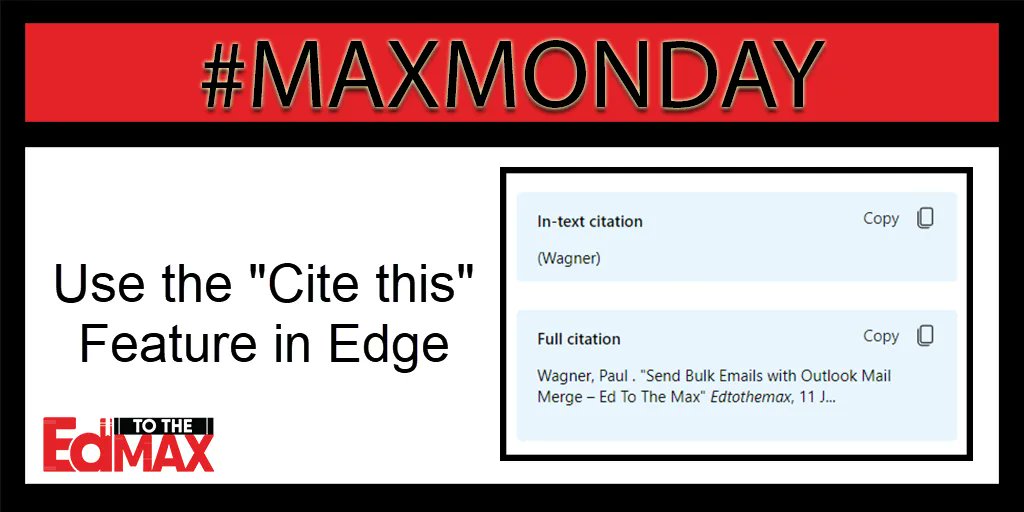
This week's #MAXMonday tip comes from Specialist Melanie LeJeune: Melanie LeJeune. Use the Edge Browser when researching to get citation help. Learn more here: edtothemax.com/citation-tools…
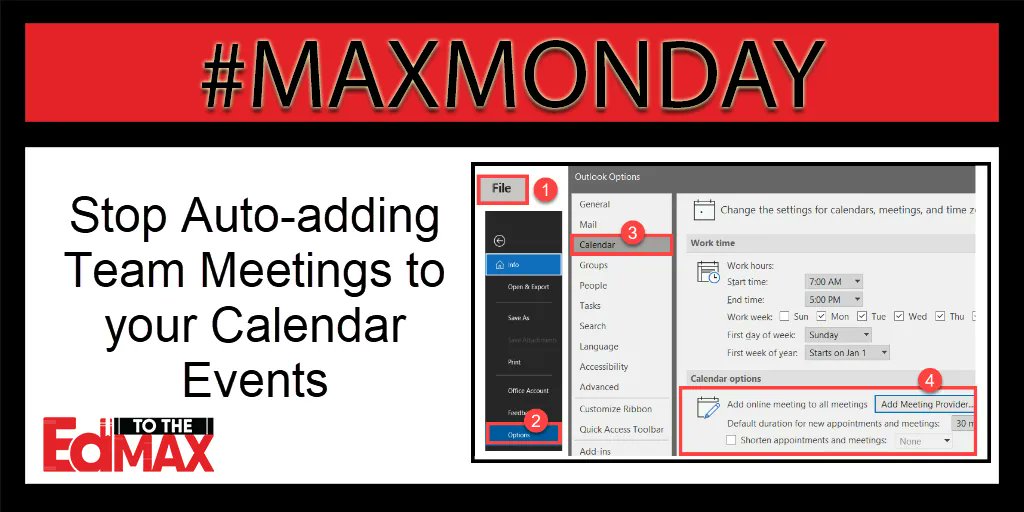
This week's #MAXMonday tip comes from Specialist Paul Wagner: Paul Wagner. An update adds a Teams link to every calendar event. You can turn the auto-add meeting feature off. Open your calendar options and make the adjustment. Find more tips at edtothemax.com
This week's #MAXMonday tip comes from Specialist Melanie LeJeune: Melanie LeJeune. If Microsoft Teams is acting strange, check for updates. Click the 3-dot menu in the top right corner. Next, choose "check for updates." Find more tips at edtothemax.com

This week's #MAXMonday tip comes from Specialist Melanie LeJeune: Melanie LeJeune. Import an existing quiz into Microsoft Forms. Select the Import button. Then upload a Word or PDF file. Select "See import guidance" to get it just right. Find more tips at edtothemax.com

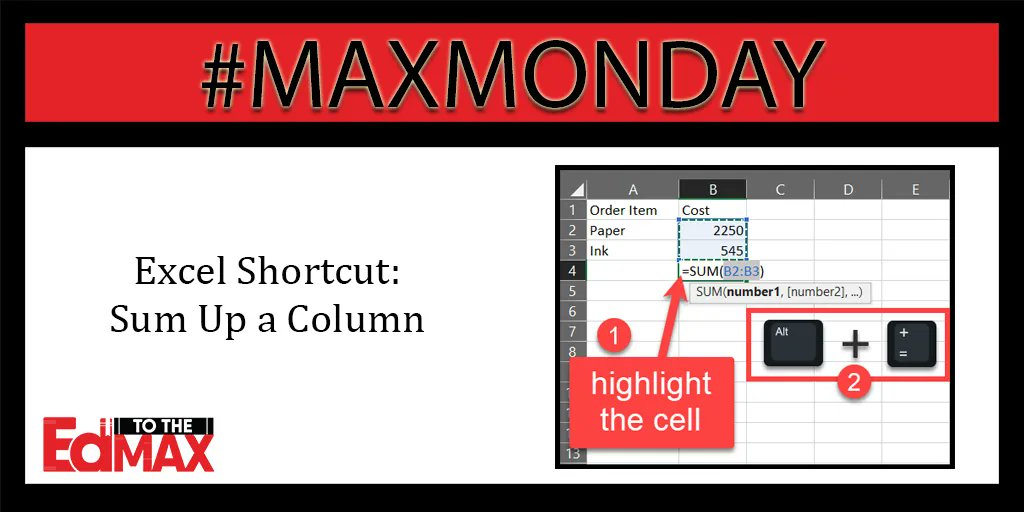
This week's #MAXMonday tip comes from Specialist Paul Wagner: Paul Wagner. Quickly sum up a column in Excel. Highlight a cell in the column below the data u want to sum. Press Alt and =. It will sum up cells above it. Find more tips at edtothemax.com.
This week's #MAXMonday tip comes from Specialist Paul Wagner: Paul Wagner. You can now annotate over whatever you are sharing on your screen in Microsoft Teams. Choose if just you can annotate or if anyone can! Learn more here: edtothemax.com/annotation-too…






This week's #MAXMonday tip comes from Specialist Paul Wagner: Paul Wagner. Quickly capitalize all words within an Excel cell or column by using the "=proper" function. Add the cell you wish to capitalize inside the parentheses. Find more tips at edtothemax.com.
This week's #MAXMonday tip comes from Specialist Paul Wagner: Paul Wagner. Copy or Move a sheet of data to a new file. Right-click the sheet name, select Move or Copy, and choose a new book. Find more tips at edtothemax.com.
This week's #MAXMonday tip comes from Specialist Paul Wagner: Paul Wagner. Canvas and Microsoft make an incredible team! There are so many things you can do. Learn more here: edtothemax.com/canvas-and-mic…

This week's #MAXMonday tip comes from Specialist Paul Wagner: Paul Wagner. Quickly capitalize all letters in Excel by using the "=upper" function. Add the cell in which you wish to capitalize all letters inside the parentheses. Find more tips at edtothemax.com.
This week's #MAXMonday tip comes from Specialist Paul Wagner: Paul Wagner. Use the Ctrl + E function in Excel to quickly autofill a column with a specific format. Find more tips at edtothemax.com.
This week's #MAXMonday tip comes from Specialist Paul Wagner: Paul Wagner. Adjust the widths of all columns in an Excel spreadsheet with the Alt + H O I shortcut. Find more tips at edtothemax.com.
This week's #MAXMonday tip comes from Specialist Paul Wagner: Paul Wagner. Utilize Forms with Teams to collect data. Share results in the post! In a new conversation, select the 3-dot menu and choose Forms. Then follow the prompts. Find more tips at edtothemax.com.

This week's #MAXMonday tip comes from Specialist Paul Wagner: Paul Wagner. We know Ctrl +Z to undo, but don't forget Ctrl + Y will redo anything you just deleted or undid. Find more tips at edtothemax.com.